Introduction
Choosing attendance tracking software often looks easy on paper. You compare a few tools, skim feature lists, check pricing, and pick one that “does it all.”
In reality, this is where many teams go wrong.
After 12+ years of working with HR, operations, and leadership teams, I’ve seen attendance tools fail not because the software was bad—but because the decision was rushed, tool-first, and disconnected from how attendance actually works inside the company.
This guide will help you choose attendance tracking software the right way: starting with your reality, not the vendor pitch.
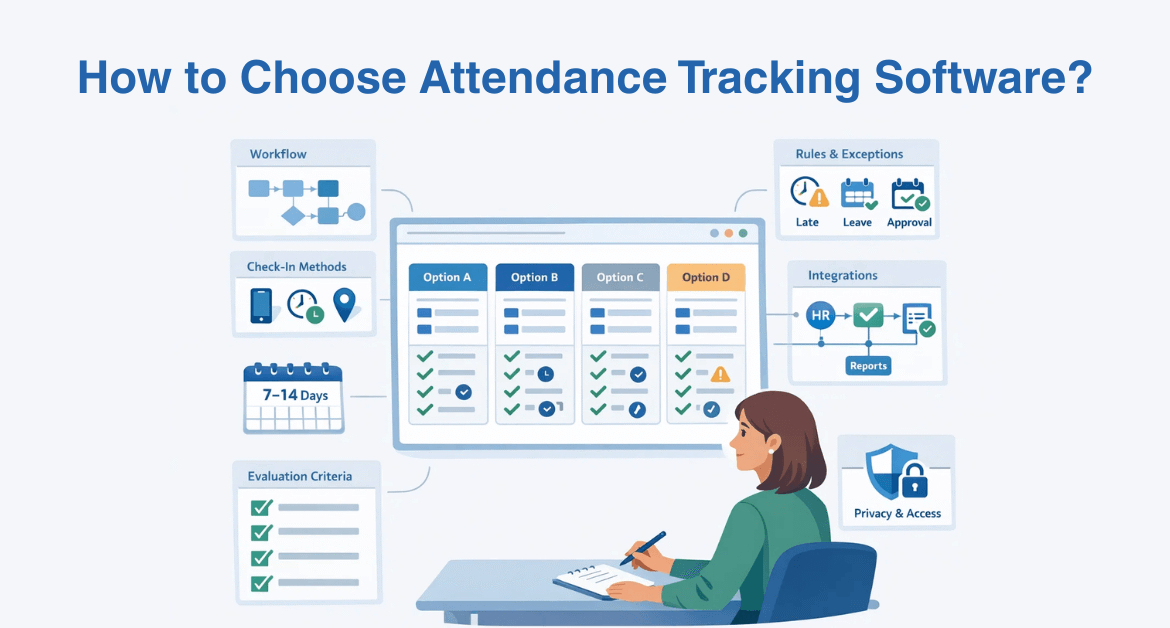
Quick Answer: How to Choose Attendance Tracking Software
If you want the short version, here it is:
- Map how attendance really works in your business
- Decide how attendance should be recorded and verified
- List non-negotiable features and exception rules
- Check payroll and HR integrations
- Review privacy and role-based access controls
- Run a short pilot (7–14 days)
- Compare vendors using a simple scoring matrix
Now let’s walk through this step by step.
What Is Attendance Tracking Software (and What It’s Not)
Attendance tracking software records employee availability —when people are present, absent, late, or on leave during expected working hours.
It’s important to be clear about what it does not do:
- It does not measure productivity
- It does not evaluate performance
- It does not track task output
Attendance tracking answers one question: “Was the employee available as expected?”
Teams that confuse attendance tracking with productivity tracking often end up with resistance and mistrust—because employees feel evaluated on the wrong things.
Industry data shows that 96% of companies use some form of time-tracking software today — and by 2025, about 70% of large firms will monitor employee activity — illustrating how pervasive attendance and time tracking has become.
The 7-Step Checklist to Choose Attendance Tracking Software
Step 1: Map Your Attendance Reality Before Looking at Tools
This is the most skipped—and most important—step.
Before comparing software, write down:
- Where your teams work: office, remote, hybrid, field
- Work patterns : fixed shifts, flexible hours, multiple shifts
- Exceptions: travel, client visits, downtime, on-call work
- Policies: grace time, overtime, breaks, leave rules
If you don’t do this first, no tool will feel like the “right fit.”
Tools like Mera Monitor are often used as enablers here—not to define policy, but to reflect real attendance patterns across distributed teams.
Step 2: Choose the Right Check-In Method and Verification Level
Not every business needs strict verification.
Common options include:
- Web or mobile check-in/out
- Shift-based attendance
- GPS or geofencing (useful for field teams)
- Kiosk or device-based attendance
- Biometric systems (only where justified)
The stricter the method, the higher the accuracy—but also the higher the trust and communication requirement.
I’ve seen perfectly capable tools rejected by teams simply because the verification method felt excessive for the work being done.
Step 3: Define Your Must-Have Features (Non-Negotiables)
Focus on what actually causes friction later:
- Shift and schedule support
- Late, early, and half-day rules
- Leave and holiday sync
- Approval workflows (manager / HR)
- Clear attendance and exception reports
- Mobile access and offline support (if needed)
Avoid buying for features you might need someday. Buy for what breaks today.
Step 4: Check Integrations That Matter
Attendance tracking rarely lives alone.
According to a research , adopting automated attendance and time management software can reduce payroll errors by up to 60% , which translates to more accurate pay cycles and fewer disputes for HR teams.
Make sure the software integrates with:
- Payroll systems (or at least clean exports)
- HR systems (employee joiners/leavers)
- Accounting or reporting tools if required
Test integrations during a pilot—not after rollout.
Step 5: Privacy, Role-Based Access, and Policy Fit
This is where many tools lose employee trust.
Ask:
- Who can see whose attendance data?
- Can managers see only their teams?
- Can HR access summaries without exposing everything?
- Is attendance data retained responsibly?
Platforms like Mera Monitor support role-based access so attendance data stays visible and controlled.
Attendance systems succeed long-term when visibility is intentional—not when everyone sees everything.
Step 6: Reports and Insights You’ll Actually Use
You don’t need dozens of dashboards.
Look for reports that help you:
- Spot absenteeism patterns
- Review late or early trends
- Identify exception-heavy teams
- Prepare payroll quickly
If managers can’t understand reports in under five minutes, adoption will suffer.
Step 7: Compare Vendors Using a Simple Scoring Matrix
Instead of “gut feel,” score vendors against what matters:
Example weighting:
- Fit to your work model
- Exception handling
- Integrations
- Ease of use
- Privacy and access control
- Reporting quality
- Support and onboarding
- Total cost of ownership
Red flags to watch for:
- Hard-to-export data
- Weak exception handling
- Poor support SLAs
- Overly invasive defaults
Pilot First: Run a 7–14 Day Proof of Fit
Before full rollout:
- Pick a team with real exceptions
- Test rules, approvals, and reports
- Collect manager and employee feedback
- Adjust policies before scaling
A good pilot doesn’t prove the software works—it proves the policy, workflow, and adoption model work together.
Rollout Plan That Prevents Adoption Failure (30/60/90 Days)
Choosing the right attendance tracking software is only half the job. Whether it actually works long term depends on how you roll it out .
Most adoption failures happen because teams expect instant compliance without giving people time to adjust. A structured 30/60/90-day rollout avoids that.
First 30 Days: Set the Foundation (Clarity Before Control)
The first month is about expectations, not enforcement .
Focus on:
- Finalizing attendance policies (shifts, grace periods, exceptions)
- Communicating why attendance is being tracked and what is not
- Training managers on approvals and exceptions
- Giving employees time to get familiar with check-in methods
What to track in this phase:
- Missed check-ins
- Policy confusion
- Manager approval delays
The goal is understanding , not perfect data.
Next 60 Days: Stabilize and Fix Friction
By the second month, patterns start to emerge.
This is where you:
- Refine exception rules based on real scenarios
- Stabilize payroll and HR integrations
- Identify teams or roles with repeated issues
- Standardize how managers review and approve attendance
What to track in this phase:
- Exception frequency
- Approval turnaround time
- Payroll correction requests
At this stage, you’re removing friction—not tightening rules.
By 90 Days: Optimize and Govern
Once the system is stable, attendance tracking becomes routine.
Now focus on:
- Monthly attendance trend reviews
- Clear ownership (who reviews what, and when)
- Using insights for planning—not policing
- Ensuring access controls are still appropriate
What to track in this phase:
- Absenteeism trends
- Policy compliance consistency
- Reporting accuracy
This is where attendance tracking shifts from administration to decision support .
Why This 30/60/90 Approach Works
Attendance systems fail when they’re treated as a switch instead of a process.
A phased rollout:
- Builds trust gradually
- Reduces resistance
- Improves data quality over time
- Prevents “tool fatigue” and workarounds
By the end of 90 days, attendance tracking should feel boring—and that’s a good thing . It means the system fits how people actually work.
Pricing and Total Cost of Ownership
When comparing costs, look beyond per-user pricing:
- Hardware or setup fees
- Custom rule configuration
- Support and training
- Contract lock-ins
Gartner research indicates that companies using automated attendance systems can reduce payroll processing costs by around 30% , highlighting how automation often pays for itself.
The cheapest tool upfront is often the most expensive to fix later.
Final Checklist: Choosing the Right Attendance Tracking Software
- Fits your real work model
- Handles exceptions cleanly
- Integrates with payroll/HR
- Respects privacy and access control
- Easy for managers and employees
- Proven in a pilot, not just a demo
Key Takeaway
The right attendance tracking software isn’t the one with the longest feature list. It’s the one that fits your policies, respects your people, and stays easy to use as you grow.
Choose clarity over complexity—and your attendance system will support your business instead of slowing it down.