Task-Based Time Tracking: Improve Accuracy & Productivity

    Task-Based Time Tracking: Why It’s Better Than Hour-Based Logging

Introduction

If you’ve ever looked at a timesheet that simply says “8 hours – Project Work” and thought, “Okay, but what actually happened?” — you’re not alone.

Most teams don’t struggle because people aren’t working. They struggle because their tracking system doesn’t reflect reality.

And after spending 12+ years working with engineering, design, support, and consulting teams, I’ve learned one thing very clearly: Teams don’t fall behind because hours weren’t logged. They fall behind because the hours weren’t tied to the right tasks.

That’s exactly where task-based time tracking becomes a game-changer.

This guide will walk you through what it is, how it compares to hourly logging, why it saves time and money, and how to implement it without overwhelming your team.

Let’s break it down the way real teams actually work.

What Is Task-Based Time Tracking?

Task-based time tracking — sometimes called task-level time tracking — means logging time against the specific tasks you’re working on, not just blocks of time.

Instead of:

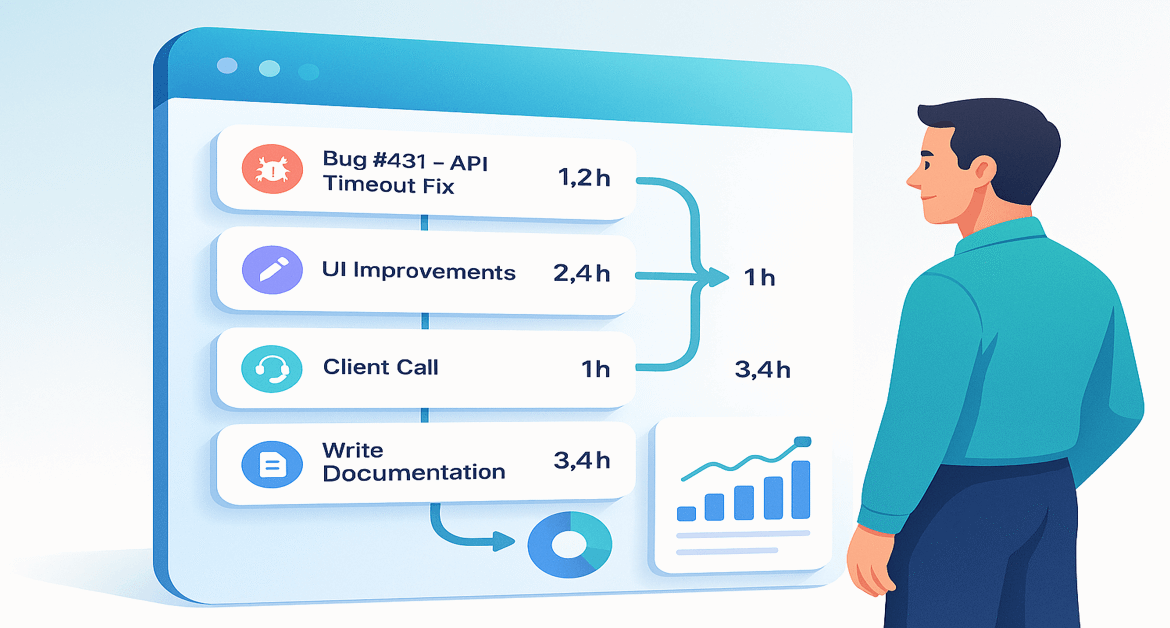
  • 8 hours → “Development”

You get:

  • 1.2 hours → “Bug #431 – API timeout fix”
  • 2.4 hours → “Login redesign (UI changes)”
  • 1 hour → “Client call”
  • 3.4 hours → “Unit testing + documentation”

This method captures output, not just time spent.

And unlike generic daily logs, task-based tracking shows patterns, bottlenecks, and workload clarity immediately.

How Traditional Hour-Based Logging Works (and Where It Breaks Down)

Hour-based tracking is the classic approach:

  • Clock in
  • Clock out
  • Enter total hours (often at the end of the day… or week)

Simple? Yes.

Accurate? Usually not.

Here’s the uncomfortable truth:

1. People guess hours — they don’t recall them

Research shows employees typically miss or underestimate about 40–50% of the work they did earlier in the day when logging time retrospectively.

2. It hides what truly took time

You see 7 hours logged… But was it coding? Meetings? Fixing mistakes? Helping someone else? You never really know.

3. It creates payroll leakage

Inflated hours, forgotten hours, and ambiguous entries quickly become costly.

4. It doesn’t help with estimates

If every sprint has “pure 8-hour days,” how do you improve forecasting?

A quick experience insight

A few years ago, I worked with a team that logged perfect “8-hour days” every week — yet deadlines slipped constantly. When we moved them to task-based tracking, we uncovered the real issue: Over 30% of their time was going to unplanned rework and context switching.

And that ties into something important, Context switching reduces productivity by up to 40%.

Hourly logs hide this loss. Task-level logs expose it instantly.

Task-Based Time Tracking vs Hour-Based Logging (Clear Comparison)

Let’s compare both approaches in a way that resonates with real teams:

CriteriaTask-Based TrackingHour-Based Logging
AccuracyVery high — time linked to tasksLow — time often guessed
VisibilityClear breakdown of workOnly hours, no context
Billing/PayrollCleaner, defensibleProne to disputes
Project InsightsExcellentLimited
Remote WorkIdealHard to rely on
Admin OverheadLow after setupMedium to high
ForecastingStrongWeak

When you actually see what consumes time, your decision-making improves dramatically.

7 Ways Task-Based Time Tracking Saves Time & Money

This is where task-level tracking shines. Let’s keep it practical.

1. More Accurate Billing & Invoicing

Clients question hourly invoices. They rarely question task-level ones.

Real example: One agency I worked with reduced billing disputes by 60% in the first month because every billed hour had a task-level explanation tied to it.

2. Reduced Payroll Leakage

  • No more forgotten hours
  • No more inflated entries
  • No more vague “miscellaneous tasks”

When hours are tied to tasks, leakage naturally shrinks.

3. Better Project Estimates & Forecasting

Want better sprint planning? Want fewer surprises?

Use past task data:

  • “Bug fixes usually take 45–90 minutes.”
  • “Design revisions add 20–30% overhead.”
  • “API tasks average 3.5 hours.”

Great estimates come from patterns, and patterns come from tasks, not hours.

4. Smarter Resource Allocation

You finally see:

  • Who is overloaded
  • Who is underutilized
  • Which tasks consistently create bottlenecks

This helps in hiring decisions, priority decisions, and project planning.

5. Higher Productivity Through Focused Work

When people log tasks instead of hours, they naturally work in focused blocks.

  • Less multitasking.
  • Less chaos.
  • More intention.

And since context switching is shown to reduce productivity by up to 40%, task-based tracking helps teams avoid that trap.

6. Cleaner Billable vs Non-Billable Visibility

You can instantly see:
Revenue-generating work

  • Admin work
  • Meetings
  • Support time
  • Rework

This clarity is impossible to get from plain hourly logs.

7. Easier Performance Coaching (Not Micromanagement)

You’re not judging people by hours. You’re understanding workload patterns:

  • Which tasks slow the team down
  • Which processes need fixing
  • Where support is needed

These are meaningful coaching insights — not surveillance metrics.

Real-World Use Cases for Task-Based Time Tracking

Agencies & Service Firms

Perfect for separating creative work, revisions, client calls, and deliverables.

Engineering & Product Teams

See actual time for debugging, reviews, testing, sprint tasks, and deployments.

Remote Teams

Task-level visibility is far more reliable than generic hour entries.

Freelancers & Consultants

Justify every invoice with clarity and confidence.

Support & Operations Teams

Tickets become tasks → reports become automatic.

How to Implement Task-Based Time Tracking (Step-by-Step)

Teams often resist time tracking because it feels like “extra admin.” But when rolled out correctly, adoption becomes easy.

Here’s what’s worked repeatedly in my own implementations:

Step 1: Map Your Work into Projects & Tasks

Sit with each team and define:

  • Recurring tasks
  • Deliverables
  • Categories
  • Subtasks

This foundation makes the entire system run smoothly.

Step 2: Choose Manual, Automated, or Hybrid Tracking

  • Manual: Click start/stop on each task
  • Automated: Tool auto-captures activity
  • Hybrid: Best for modern teams (combine both)

Step 3: Configure Your Time Tracking Tool Properly

Set up:

Good setup = good data.

Step 4: Introduce It to Your Team the Right Way

Here’s a lesson from experience: “When people understand that task-based time tracking reduces weekend fires, improves planning, and makes workloads fair — not that it ‘monitors’ them — adoption skyrockets.”

Explain the “why,” not just the “how.”

Step 5: Start Small, Then Scale

  • Pilot with one team.
  • Refine your categories.
  • Expand gradually.

This minimizes resistance and maximizes clarity.

Features to Look For in Task-Based Time Tracking Software

Look for tools that support:

  • 1-click task timers
  • Subtasks & reusable templates
  • Real-time reporting
  • Tags (client, sprint, category, billable, etc.)
  • Idle time detection
  • Screenshot/activity capture (only if required)
  • Integrations (Karya Keeper, Asana, Trello, ClickUp)
  • Role-based permissions

These features ensure your data is accurate, contextual, and actionable.

Common Mistakes to Avoid

Avoid:

  • Overly vague task names
  • Overly granular task lists
  • Not training the team
  • Using data for policing instead of coaching
  • Tracking but never analyzing

Time tracking is only as valuable as the decisions it improves.

How to Measure Success (The Metrics That Actually Matter)

Time & Money

  • Actual vs estimated task time
  • Billable %
  • Rework time
  • Cost per project

Productivity & Team Health

These metrics give you a complete picture of performance.

When Task-Based Time Tracking Might NOT Be Ideal

There are cases where hourly logging is fine:

  • Highly repetitive, predictable work
  • Purely attendance-based roles
  • Organizations without defined processes

Even then, basic task tags can still improve accuracy.

Final Thoughts

To put it simply:

  • Hourly tracking measures time.
  • Task-based tracking measures work.

If you want clearer insights, stronger estimates, fewer billing disputes, and a more predictable team — task-based time tracking is one of the simplest upgrades you can make.

And once you experience the clarity it brings, it’s almost impossible to go back.

FAQs

Task-based time tracking means recording time against specific tasks instead of logging total daily hours.

For example, instead of “8 hours – Development,” you track exactly how long each task took: debugging, UI changes, client calls, etc.

This creates clearer patterns, better insights, and far more accurate project forecasting.
Because hourly logging often relies on memory — and research shows people underestimate or forget 40–50% of their work when filling timesheets retrospectively.

Task-based tracking is done as you work, which captures real effort, reduces rounding errors, and eliminates vague entries like “admin” or “misc.”

It highlights where time actually goes, including bottlenecks, context switching, rework, and low-value tasks.

Teams can then reorganize workloads, protect focus time, reduce interruptions, and set realistic deadlines — all of which significantly improve productivity and morale.

It’s ideal for teams that work on deliverables, projects, or service-based tasks — such as engineering, design, support, consulting, agencies, and remote teams.

For highly repetitive or attendance-only roles, basic hour-based logging may be enough, but adding simple task tags can still improve clarity.

Start small:

  • Pick one team or project
  • Define clear task categories
  • Configure your tool simply
  • Communicate the why, not just the process
  • Review data weekly and refine as you go

Most teams see smoother adoption when they co-create categories and understand how the data helps them — not just management.

Table of Contents

Author

  • Shashikant Tiwari is a digital marketing strategist with extensive experience in SEO, content strategy, and B2B SaaS marketing. At Mera Monitor, he creates actionable resources that help businesses track productivity, boost accountability, and empower teams to perform at their best.