Introduction
If you’re searching for Flowace alternatives , you’re probably not casually browsing tools.
Something isn’t working the way it should.
Maybe the reporting isn’t giving leadership the clarity they need.
Maybe employees feel the tool is too intrusive.
Or maybe the data exists — but it’s not actually helping managers make better decisions.
After working with PMOs, IT leaders, HR teams, and operations heads for more than 12+ years , I’ve noticed a pattern:
Teams rarely switch tools because features are missing.
They switch because the system creates more friction than visibility .
This guide will help you:
- Discover the best Flowace alternatives
- Compare tools based on real use cases
- Understand which solution fits your team type
- Avoid common mistakes when switching productivity tools
Let’s start with a quick shortlist.
Quick Answer: Best Flowace Alternatives in 2026
If you want a fast overview, these are the top Flowace competitors worth evaluating:
| Tool | Best For |
|---|---|
| Mera Monitor | Productivity insights and work visibility for remote, hybrid, and in-office teams |
| Time Doctor | Deep productivity tracking and workforce analytics |
| Hubstaff | Remote teams and distributed workforce tracking |
| ActivTrak | Workforce analytics and employee behavior insights |
| Insightful | Workforce analytics and operational productivity insights |
| DeskTime | Automatic time tracking with productivity classification |
| Clockify | Budget-friendly time tracking |
| Toggl Track | Lightweight time tracking for teams |
| Teramind | Security-focused monitoring and insider threat detection |
| WebWork Time Tracker | Freelancer and agency productivity monitoring |
| Time Champ | Employee monitoring with productivity analytics |
Each tool solves a slightly different problem. The right one depends on what you’re trying to fix inside your organization.
Why Teams Look for Flowace Alternatives
Most people assume they’re switching tools because of features .
In reality, the reasons are usually operational.
1. You need more than activity tracking
Basic tracking tools show screenshots or time logs .
But managers need answers like:
- Are we on track with work?
- Where is time actually going?
- Which teams are overloaded?
Without those insights, the tool becomes just another dashboard nobody checks.
Recent workplace research shows why simple activity data is not enough. According to Gallup , only 46% of employees clearly know what is expected of them at work, which means many teams are already operating without the level of clarity managers assume they have. If a tool only captures activity but does not improve visibility into priorities, ownership, and outcomes, it rarely solves the real problem.
2. Your team wants visibility without feeling monitored
This is a sensitive topic.
Tracking tools should create clarity , not distrust.
One CTO I worked with told me something that stuck with me:
“The moment a tool feels like surveillance instead of visibility, adoption drops overnight.”
The best Flowace alternatives balance transparency with accountability .
3. Reporting or integrations limit adoption
Another common challenge is report usability .
A tool might collect tons of data, but if managers still rely on manual spreadsheets , the system isn’t doing its job.
I’ve seen organizations abandon tools simply because:
- Reports were confusing
- Data couldn’t be shared easily
- Managers couldn’t interpret productivity trends
That problem is more common than many teams realize. Asana’s 2025 research found that knowledge workers spend 60% of their time on “work about work” — things like chasing updates, attending unnecessary meetings, and context switching between tools — instead of doing skilled, strategic work. When reporting is fragmented or hard to interpret, it adds to this coordination burden instead of reducing it.
4. The tool doesn’t match your team’s workflow
Some tools work well for:
- freelancers
- agencies
- small teams
But they struggle with:
- hybrid teams
- enterprise governance
- cross-department visibility
Switching tools often happens when the company outgrows the system .
How We Evaluated the Best Flowace Alternatives
Not every productivity tool belongs in a Flowace competitor list.
To shortlist the best options, we evaluated tools based on:
- Time tracking accuracy
- Productivity monitoring capabilities
- Screenshots and activity tracking
- Reporting and analytics
- Privacy controls
- Ease of implementation
- Integration ecosystem
- Pricing transparency
- Team adoption
- Manager usability
The goal was simple:
Find tools that actually help teams work better , not just track hours.
Best Flowace Alternatives Compared
Here’s a quick comparison to help you narrow down options.
| Tool | Best For | Key Strength |
|---|---|---|
| Mera Monitor | Balanced monitoring + reporting | Clear productivity visibility |
| Time Doctor | Deep analytics | Advanced workforce insights |
| Hubstaff | Remote workforce | GPS & distributed tracking |
| ActivTrak | Workforce analytics | Behavioral insights |
| Insightful | Operational monitoring | Detailed activity tracking |
| DeskTime | Automatic time tracking | Simple setup |
| Clockify | Budget teams | Free plan availability |
| Toggl Track | Lightweight tracking | Clean interface |
| Teramind | Security-focused companies | Insider threat detection |
| WebWork | Agencies | Freelancer monitoring |
| Time Champ | Productivity + time | Integrated insights |
Now let’s look at them in detail.
Top 11 Flowace Alternatives
1. Mera Monitor
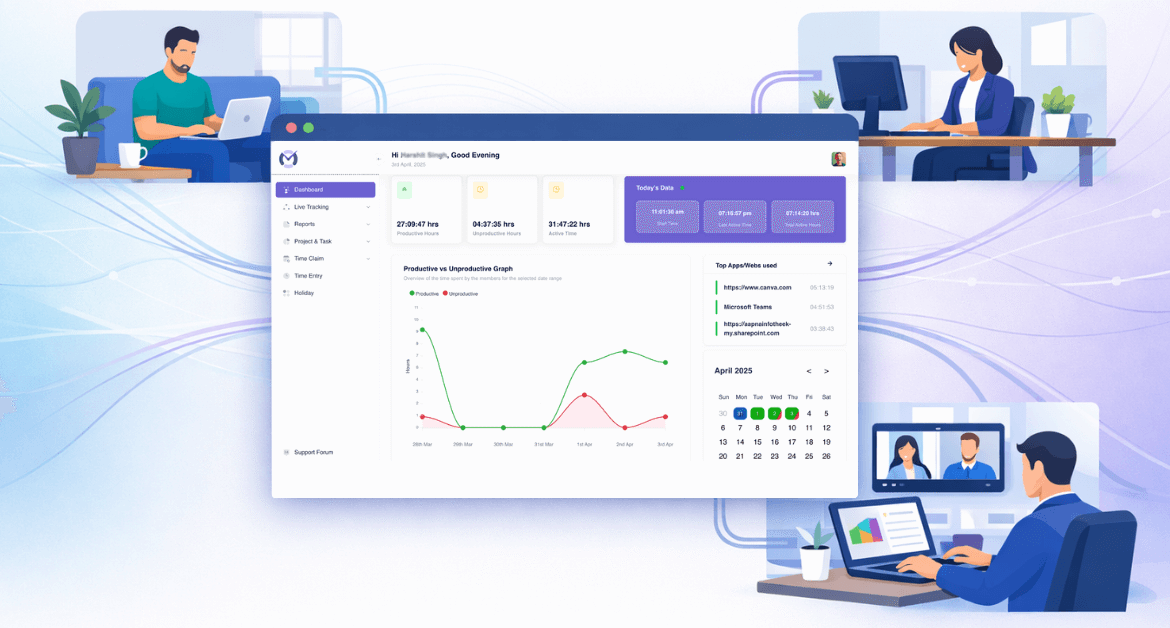
Mera Monitor is built for businesses that want productivity tracking, time visibility, and team insights across remote, hybrid, and in-office teams. It helps managers understand how time is spent, what work patterns look like, and where they may need more clarity.
Key features
- Automatic time tracking
- Screenshot monitoring
- App and website usage tracking
- Live screen monitoring
- Productivity reports and dashboards
- Team-wise visibility across work models
Pros
- Good fit for remote, hybrid, and office teams
- Strong visibility into work habits and productivity trends
- Practical reporting for managers
- Positions well around productivity, not just tracking
Cons
- Some users may want more advanced reports and executive-level dashboards
- May not suit teams looking for very lightweight time tracking only
Pricing
- /user/month billed monthly
- /user/month billed annually
- Enterprise pricing available for larger teams
Ratings
- Techjockey.: 4.6/5
- Produchunt : 5.0/5
- SoftwareSuggest: 5.0/5
2. Time Doctor
Time Doctor is one of the most established tools in this category and works well for teams that want deep productivity tracking and workforce analytics. It is designed for distributed, remote, and in-office teams that need stronger reporting and performance visibility.
Key features
- Time tracking
- Screenshots
- App and website usage tracking
- Productivity reports
- Workforce analytics
- Payroll support
Pros
- Strong analytical depth
- Good fit for distributed teams
- Widely recognized in the category
- Better suited than lightweight trackers for performance visibility
Cons
- Can feel heavier than simple time trackers
- May be more data-rich than some small teams need
Pricing
- Starts around .67/user/month – billed annually
- Annual plans usually offer better value than monthly billing
Ratings
- Capterra: 4.5/5
- SoftwareSuggest: 4.7/5
3. Hubstaff
Hubstaff is a strong alternative for remote teams and distributed workforce tracking. It combines time tracking with screenshots, payroll support, GPS capabilities, and operational visibility.
Key features
- Time tracking
- Timesheets
- Activity levels
- Screenshots
- GPS/location tracking
- Payroll and invoicing support
Pros
- Strong for remote team accountability
- Useful for payroll-linked time tracking
- Good for agencies, field teams, and distributed operations
- Mature and well-known platform
Cons
- Screenshot and activity features may feel intrusive for some teams
- Reporting customization may feel limited for some users
Pricing
- Starter: .99/user/month – billed annually
- Grow: .50/user/month – billed annually
- Team: /user/month – billed annually
- Enterprise: /user/month – billed annually
Ratings
- Capterra: 4.5/5
- SoftwareSuggest: 4.0/5
If Hubstaff feels too intrusive or too focused on distributed workforce control, you may also want to explore these best Hubstaff alternatives .
4. ActivTrak
ActivTrak is better framed as a workforce analytics and productivity management platform than just a time tracker. It is useful for companies that want team-wide visibility into productivity patterns and employee behavior trends.
Key features
- Activity dashboard
- Productivity analysis
- App and website usage insights
- Alarm-triggered screenshots
- Workforce analytics
- Team-level dashboards
Pros
- Strong workforce analytics focus
- Better for leadership visibility than basic tracking tools
- Useful for trend analysis and productivity management
Cons
- Less of a lightweight time tracker
- May be more than what small teams need if they just want hours and timesheets
Pricing
- Free
- Essentials: /user/month – billed annually
- Essentials Plus: /user/month – billed annually
- Professional: /user/month – billed annually
- Enterprise: Custom pricing
Ratings
- Capterra: 4.5/5
- SoftwareSuggest: 0.0/5
5. Insightful
Insightful is positioned as workforce intelligence software with time tracking, productivity analysis, workload visibility, and operational insight. It is a better fit for teams that want more context, not just activity logs.
Key features
- Time tracking
- Activity monitoring
- Productivity analysis
- Screenshots
- Workload visibility
- Capacity and operational insights
Pros
- Strong for workload and operations visibility
- Good fit for more mature teams
- Useful for remote and hybrid team reporting
Cons
- More complex than a simple time tracker
- Some users may find certain reporting or idle-time scenarios less flexible
Pricing
- Starts around .40/seat/month billed annually
Ratings
- Capterra: 4.8/5
- SoftwareSuggest: 5.0/5
6. DeskTime
DeskTime is a fully automated time tracking and productivity management tool. Its biggest strength is reducing manual logging fatigue by running in the background and capturing work time automatically.
Key features
- Automatic time tracking
- Productivity analysis
- URL and app tracking
- Document title tracking
- Screenshots
- Attendance and absence tools
Pros
- Strong fit for teams that want less manual effort
- Automatic tracking makes adoption easier
- Useful for remote and on-site teams
Cons
- Less suited for advanced security or compliance use cases
- Not as broad as workforce-intelligence-led tools
Pricing
- Starts at .58/user/month – billed annually
Ratings
- Capterra: 4.5/5
- SoftwareSuggest: 4.7/5
7. Clockify
Clockify is a budget-friendly time tracking and timesheet platform. It is a strong alternative when the real need is affordable time tracking rather than heavier employee activity monitoring .
Key features
- Time tracking
- Timesheets
- Attendance
- Reporting
- Billing and invoicing
- Free plan for teams
Pros
- Very strong value for money
- Free plan is a major advantage
- Easy to adopt across teams
- Great fit for startups and budget-conscious companies
Cons
- Not ideal if you need deeper productivity visibility or screenshots
- Better for time discipline than monitoring-heavy workflows
Pricing
- Free
- Basic: .99/user/month – billed annually
- Standard: .49/user/month – billed annually
- Pro: .99/user/month – billed annually
- Enterprise: .99/user/month – billed annually
Ratings
- Capterra: 4.8/5
- SoftwareSuggest: 5.0/5
8. Toggl Track
Toggl Track is a lightweight time-tracking platform designed for teams that want accurate reporting without the feel of heavy oversight. It is especially useful where ease of use and culture fit matter.
Key features
- Simple time tracking
- Reports and exports
- Profitability and workload reporting
- Integrations
- Free plan for small teams
Pros
- Very easy to use
- Good reporting for a lightweight tool
- Better fit for privacy-conscious teams
- Good for consultants, agencies, and creative teams
Cons
- Not designed for screenshot-heavy or surveillance-heavy setups
- Some trade-offs come with simplicity
Pricing
- Free for up to 5 users
- Starter: /user/month – billed annually
- Premium: /user/month – billed annually
- Enterprise: Custom pricing
Ratings
- Capterra: 4.7/5
- SoftwareSuggest: 0.0/5
9. Teramind
Teramind is designed for security-focused monitoring, insider-risk detection, and compliance-aware workforce visibility. It is much more security-oriented than most tools in this list.
Key features
- Employee monitoring
- Insider threat detection
- User behavior analytics
- Data loss prevention
- Screen recording
- Compliance and alerts
Pros
- Strongest fit here for security and compliance use cases
- Good for regulated industries
- Broad monitoring and risk controls
Cons
- More tool than many SMBs need
- Less suitable if your main need is just time tracking
- Some users mention UI or support concerns
Pricing
- Pricing varies by plan and source
- Best to verify directly from the vendor’s website
Ratings
- Capterra: 4.7/5
- SoftwareSuggest: 0.0/5
10. WebWork Time Tracker
WebWork is a time-tracking and employee productivity platform with screenshots, app and website tracking, reports, and visual proof-of-work capabilities. It is especially relevant for agencies and freelancer-heavy teams.
Key features
- Time tracking
- Screenshots
- App and website tracking
- Activity monitoring
- Reports and dashboards
- Payroll and invoicing-oriented capabilities
Pros
- Good fit for agencies and outsourced teams
- Affordable relative to feature depth
- Strong for screenshot-led accountability
Cons
- Less ideal if you want a minimal, non-visual time tracker
- Some users mention mobile app limitations on certain devices
Pricing
- Starts from .99/user/month – billed annually
- Higher plans are available with more features
Ratings
- Capterra: 4.6/5
- SoftwareSuggest: 4.6/5
11. Time Champ
Time Champ is positioned as a workforce intelligence platform with employee productivity tracking, operational visibility, and automatic time tracking. It sits between classic time trackers and broader productivity intelligence tools.
Key features
- Automatic time tracking
- Productivity tracking
- Activity insights
- Work rhythm and operational clarity
- Dashboards
- Remote and hybrid employee visibility
Pros
- Strong emphasis on productivity and operational visibility
- Good fit for teams that want more than timesheets
- Flexible and easy to use for growing teams
Cons
- May be overkill if the team only needs basic time logs
- Review counts and ratings can vary a lot across platforms
Pricing
- Pricing varies by plan and source
- Best to verify directly from the vendor’s website
Ratings
- Capterra: 4.9/5
- SoftwareSuggest: 5.0/5
Note: Pricing, plans, and ratings can change over time. Please check the official website, Capterra, and SoftwareSuggest for the most up-to-date details before making a final decision.
Flowace vs Alternatives: What Actually Matters
When evaluating alternatives, focus on these questions.
1. Does the tool create clarity?
A tool should help answer:
- what work is happening
- where time goes
- what needs attention
This is not a small issue. Microsoft’s 2025 Work Trend Index found that 48% of employees and 52% of leaders say their work feels chaotic and fragmented. That is why clarity matters so much when evaluating alternatives. A tool that tracks time but still leaves managers guessing about workload, priorities, or next steps is not really reducing operational friction.
2. Will managers actually use the reports?
One COO told me during a productivity transformation project:
“If managers can’t understand the report in 30 seconds, they won’t use it.”
Simplicity matters.
3. Can employees adopt the tool easily?
Adoption is critical.
The best productivity tools fade into the background .
Signs It’s Time to Switch from Flowace
You may need an alternative if:
- managers don’t trust the reports
- employees resist the system
- you still rely on spreadsheets for visibility
- insights are unclear
- adoption is low
How to Choose the Best Flowace Alternative
Here’s a simple framework.
For startups
Focus on ease of adoption and pricing .
For growing companies
Prioritize reporting and team insights .
For enterprises
Look for:
- role-based permissions
- compliance features
- detailed analytics
One lesson I’ve learned after working with multiple productivity rollouts:
“The best tool isn’t the one with the most features — it’s the one your managers actually use.”
Migration Checklist: Switching from Flowace
If you plan to switch tools, follow this process.
1. Identify your real problem
Is it visibility?
Reporting?
Adoption?
2. Define must-have features
Examples:
- screenshot monitoring
- automated time tracking
- reporting dashboards
3. Run a pilot
Start with one department before full rollout.
4. Communicate with employees
Transparency builds trust. Explain what is tracked and why .
5. Measure success after 30 days
Evaluate:
- adoption rate
- report usefulness
- manager feedback
Closing Note
Choosing the right Flowace alternative is not about picking the tool with the longest feature list. It is about finding the platform that matches your team’s work style, reporting needs, and level of visibility required. For some businesses, that means deeper workforce analytics. For others, it means simpler time tracking, better productivity insights, or a more practical fit across remote, hybrid, and in-office teams. The best choice is the one that helps your team work with more clarity, consistency, and confidence.
FAQs
Some of the best Flowace competitors include Mera Monitor, Time Doctor, Hubstaff, ActivTrak, Insightful, DeskTime, Clockify, Toggl Track, Teramind, WebWork Time Tracker, and Time Champ.
Tools like Mera Monitor, Insightful, and Teramind offer advanced employee monitoring capabilities.
Hubstaff, Time Doctor, and Mera Monitor are strong choices for remote workforce monitoring.
Yes. Tools like Clockify and Toggl Track offer lower-cost or free plans.
Yes. Mera Monitor offers time tracking, screenshot monitoring, and productivity insights that make it a strong Flowace competitor for growing teams.