
Track employee hours, overtime, payroll, and project time with ready-to-use, free timesheet templates.
Download instantly in Excel, Word, PDF, or Google Sheets — no signup required.
Introduction
Need a simple way to track work hours, attendance, billable time, or project hours?
You’re in the right place.
This page brings together practical, ready-to-use timesheet templates designed for real workflows — not just generic formats. Whether you’re managing payroll, tracking project hours, or reviewing team attendance, you’ll find templates that actually fit how your team works.
Over the years, I’ve seen teams make the same mistake again and again: they spend too much time searching for the “perfect” template, when what they really need is the right structure for their use case.
A freelancer, a payroll admin, and a project manager don’t need the same timesheet. That’s why this page is organized by both template type and real-world usage — so you can quickly find what fits.
Quick Way to Choose the Right Template
- Use Excel → if you want formulas and automatic calculations
- Use Google Sheets → if you need real-time collaboration
- Use Word → if you want simple manual entry
- Use PDF → if you need printable or shareable records
Available Timesheet Templates
- Weekly Timesheet Template
- Monthly Timesheet Template
- Daily Timesheet Template
- Project Timesheet Template
- Employee Timesheet Template
- Biweekly Timesheet Template
- Payroll Timesheet Template
Weekly Timesheet Template
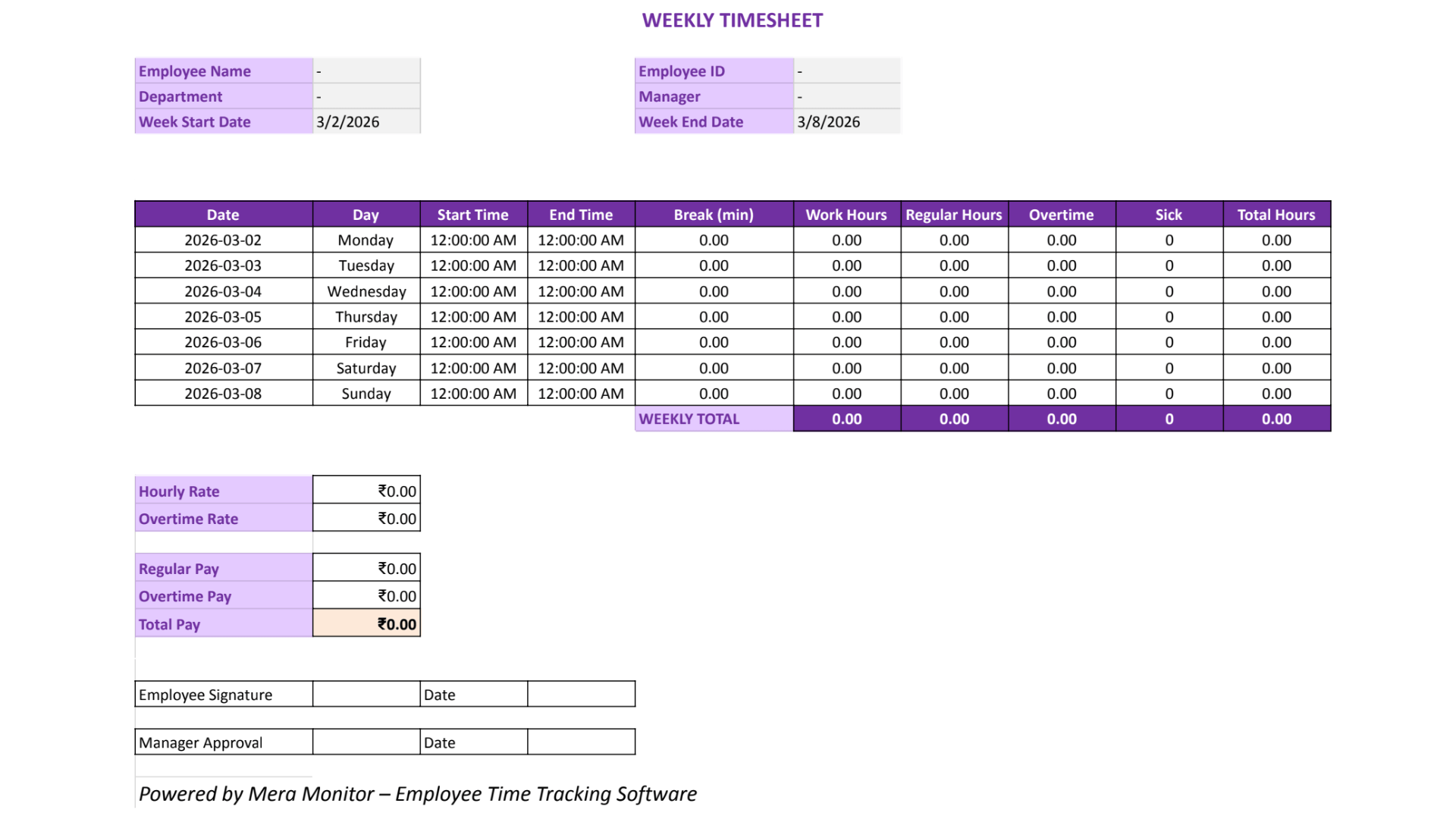
A weekly timesheet template helps track daily work hours across the week while keeping reporting simple and structured.
Best for:
- Weekly payroll cycles
- employee attendance tracking ,
- Freelancers billing weekly
- Managers reviewing regular work hours
What this template helps you do:
- Track daily work hours
- Record start time, end time, and breaks
- Calculate weekly totals and overtime
- Prepare payroll or approvals
Key features (Excel & Google Sheets):
- Automatic total hours calculation
- Overtime calculation
- Editable employee and date fields
- Reusable weekly format
Download Weekly Timesheet Template (Excel, Sheets, Word, PDF)
Instant download • No signup required


Monthly Timesheet Template
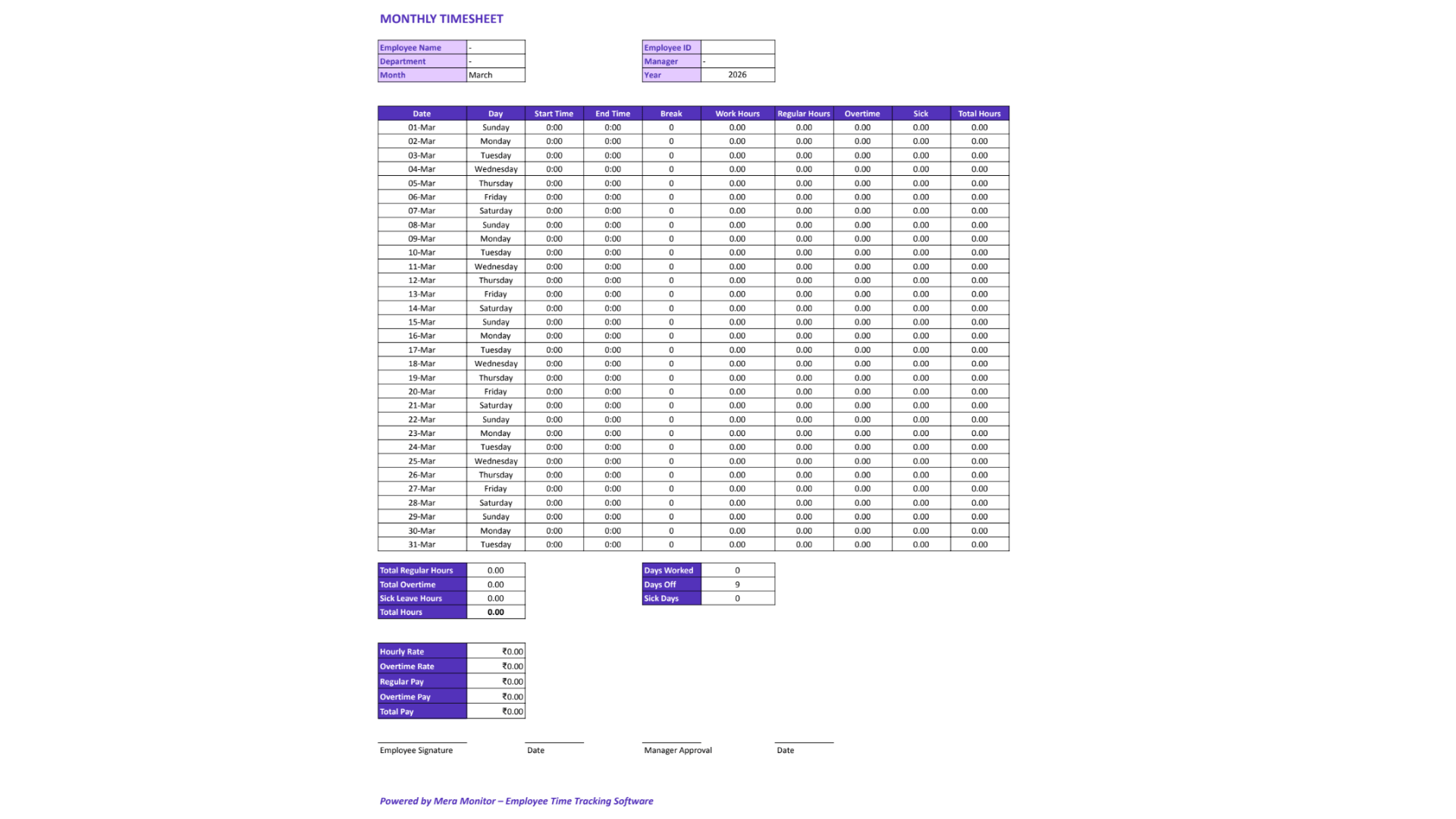
A monthly timesheet template helps track work hours over a longer period, making it ideal for reporting, attendance summaries, and recordkeeping.
Best for:
- Monthly reporting
- Employee attendance summaries
- Salaried staff tracking
- Teams that don’t need daily approvals
What this template helps you do:
- Track total monthly work hours
- Review attendance across the month
- Record overtime totals
- Maintain long-term records
Key features (Excel & Google Sheets):
- Month-wide hour summaries
- Automatic total calculations
- Easy attendance tracking
- Clean, reusable format
Download Monthly Timesheet Template (Excel, Sheets, Word, PDF)
Instant download • No signup required
Daily Timesheet Template
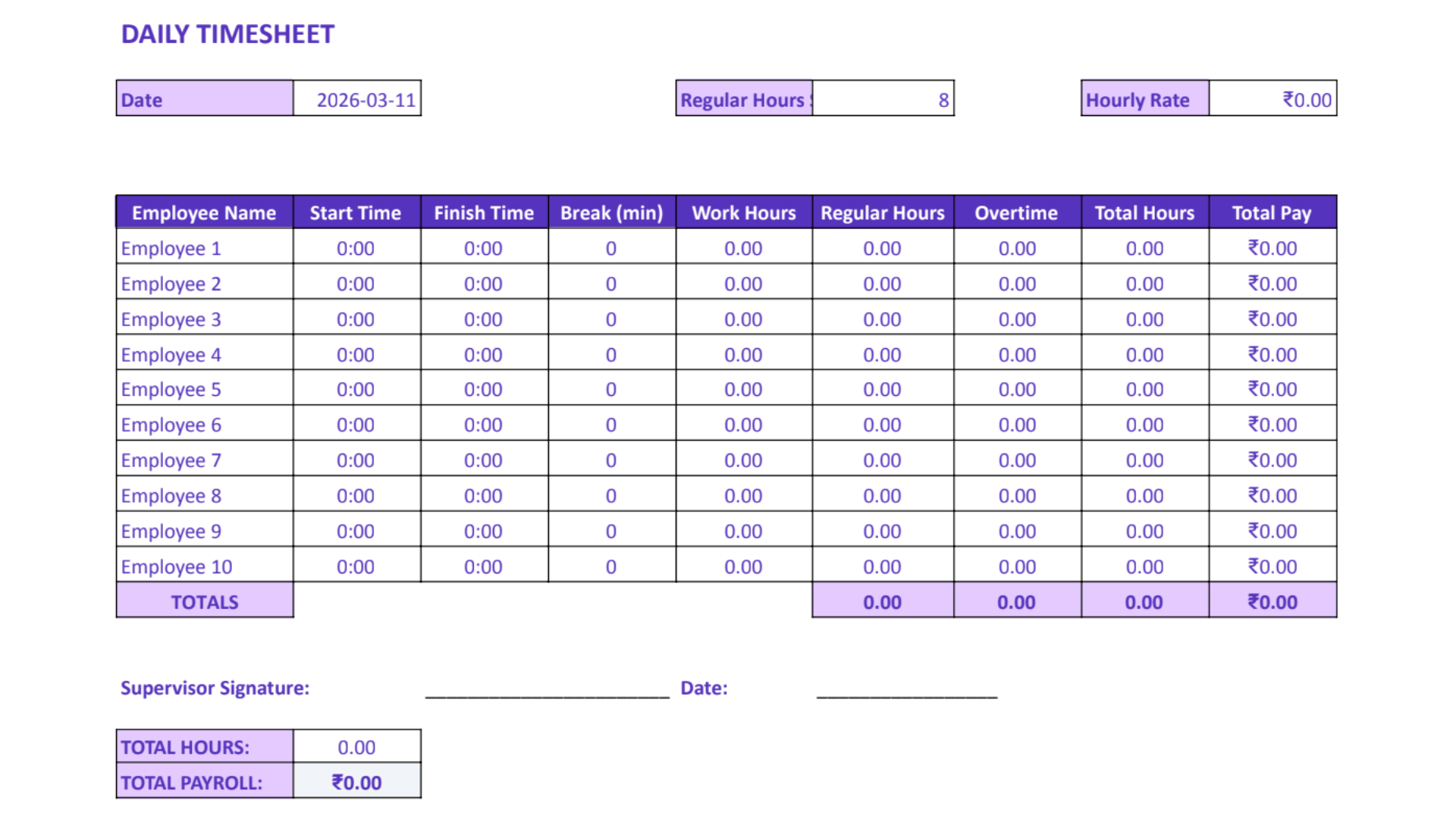
A daily timesheet template provides the most accurate view of work hours, making it ideal for shift-based and hourly tracking.
Best for:
- Shift-based teams
- Hourly employees
- Contractors
- Daily attendance tracking
- Overtime monitoring
What this template helps you do:
- Record exact start and end times
- Track breaks and daily hours
- Monitor overtime per day
- Maintain accurate daily records
Key features (Excel & Google Sheets):
- Automatic daily hour calculation
- Shift-level visibility
- Clear overtime tracking
- Easy error correction
Download Daily Timesheet Template (Excel, Sheets, Word, PDF)
Instant download • No signup required
Project Timesheet Template
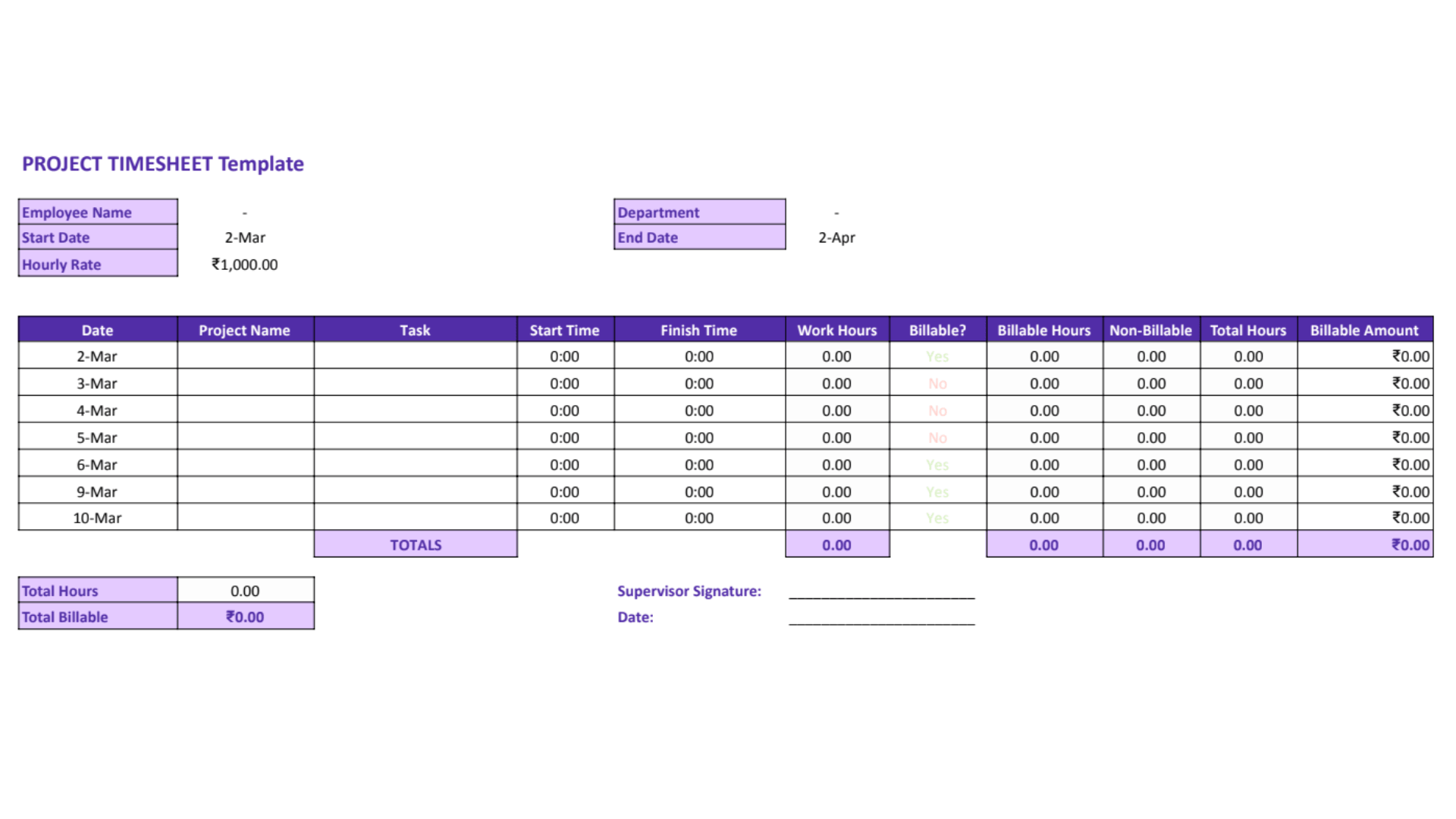
A project timesheet template helps track time by project, client, or task—giving clear visibility into where effort is actually spent.
Best for:
- Agencies
- Consultants
- Project teams
- Service businesses
- Project-based billing
What this template helps you do:
- Track hours by project or client
- Log time by task or activity
- Compare planned vs actual effort
- Support billing and reporting
Key features (Excel & Google Sheets):
- Project-wise time tracking
- Task and client-level breakdown
- Billable and non-billable fields
- Clear project reporting
Download Project Timesheet Template (Excel, Sheets, Word, PDF)
Instant download • No signup required
Employee Timesheet Template
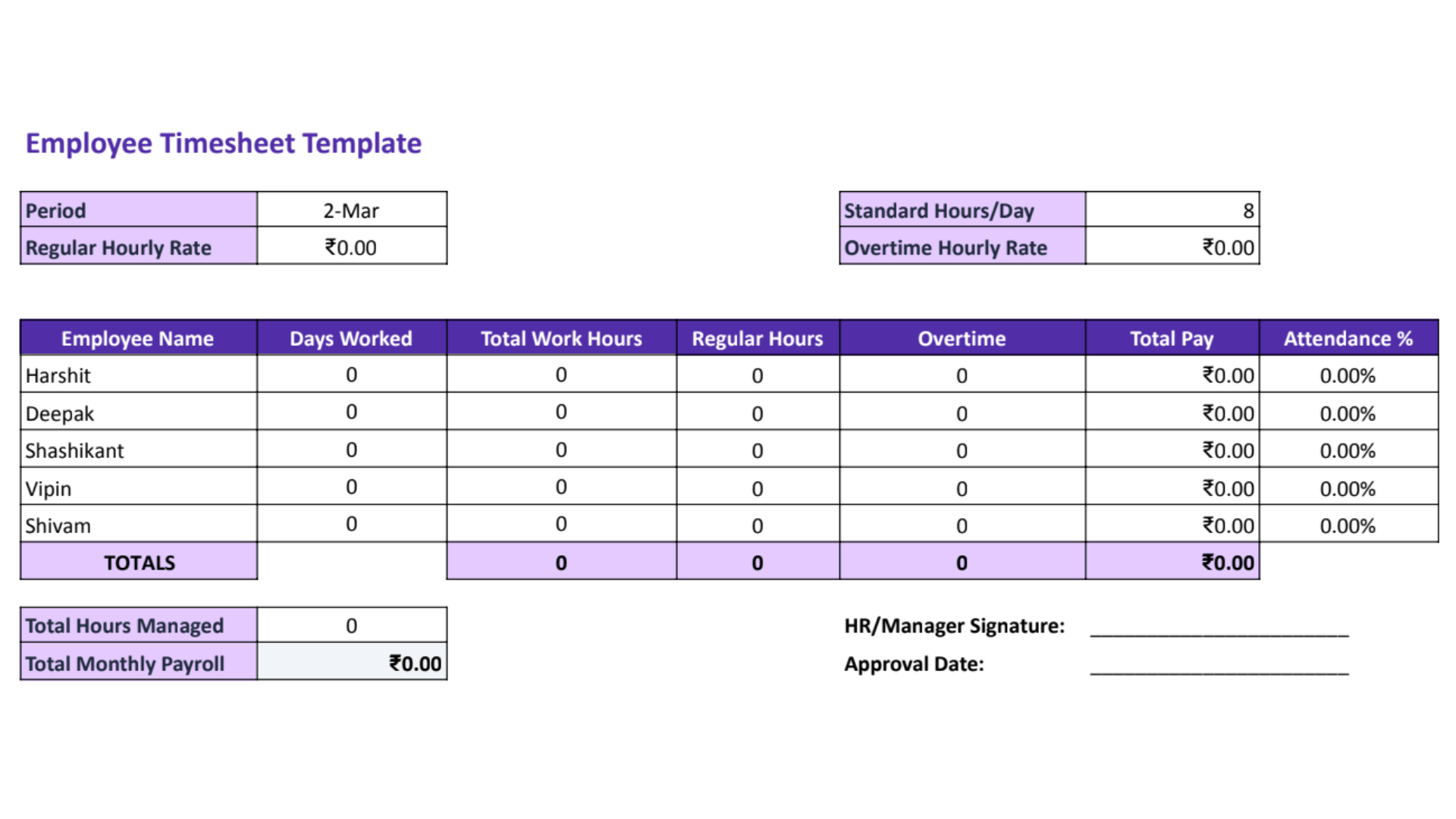
An employee timesheet template helps track work hours at the individual level, making it ideal for attendance and payroll tracking.
Best for:
- HR teams
- Small businesses
- Attendance tracking
- Employee-wise records
What this template helps you do:
- Track employee start and end times
- Record breaks and total hours
- Review weekly or monthly attendance
- Prepare employee-level summaries
Key features (Excel & Google Sheets):
- Editable employee fields
- Clean employee-wise layout
- Automatic hour calculations
- Easy record management
Download Employee Timesheet Template (Excel, Sheets, Word, PDF)
Instant download • No signup required
Biweekly Timesheet Template
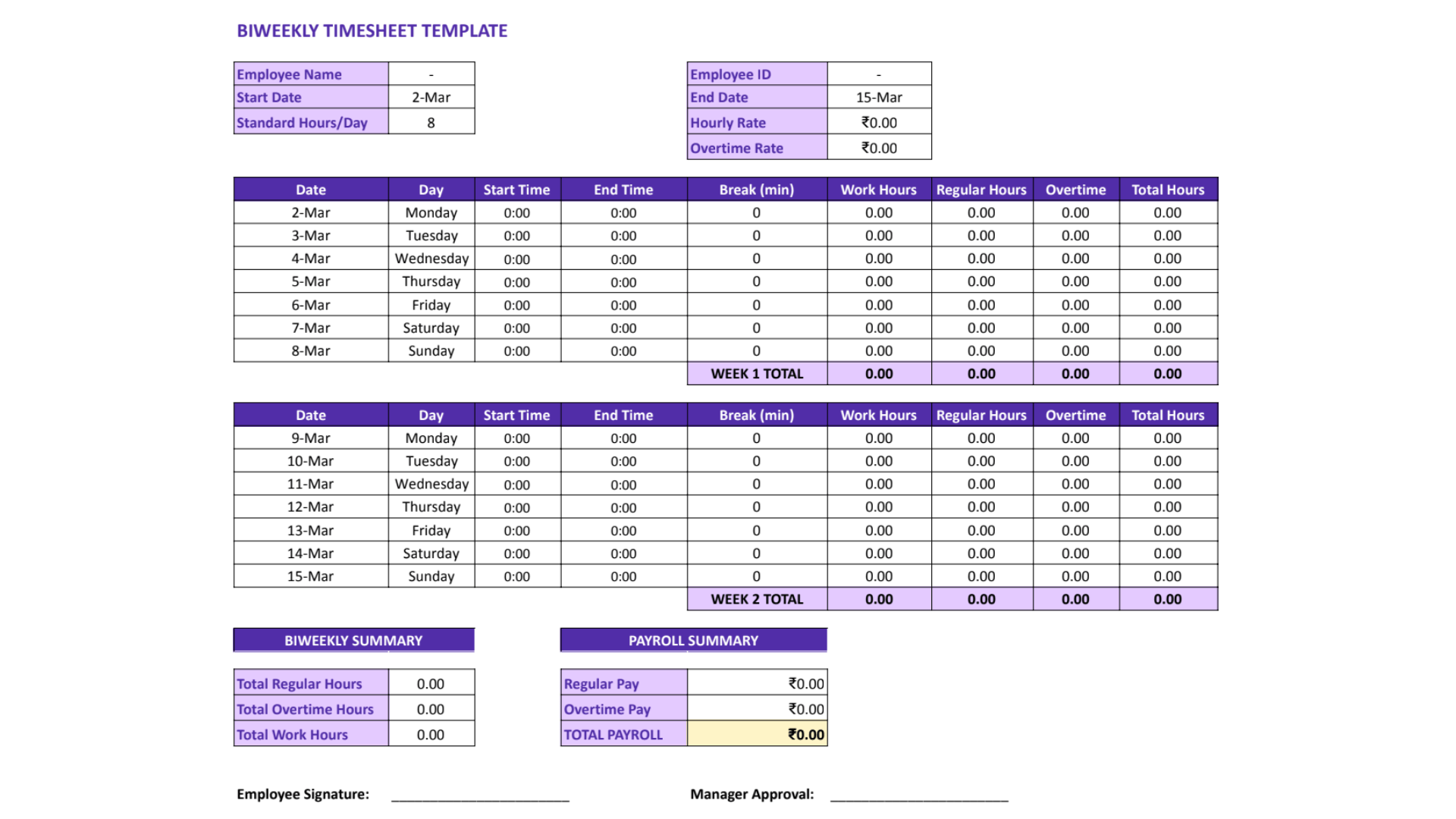
A biweekly timesheet template helps track work hours over a two-week period, making it ideal for payroll and approvals.
Best for:
- Biweekly payroll cycles
- Contract teams
- Part-time employees
- Teams managing fewer timesheets
What this template helps you do:
- Track hours across two weeks
- Record regular and overtime hours
- Simplify payroll processing
- Reduce admin effort vs weekly sheets
Key features (Excel & Google Sheets):
- Two-week hour summaries
- Automatic overtime calculation
- Payroll-friendly layout
- Simple employee tracking
Download Biweekly Timesheet Template (Excel, Sheets, Word, PDF)
Instant download • No signup required
Payroll Timesheet Template
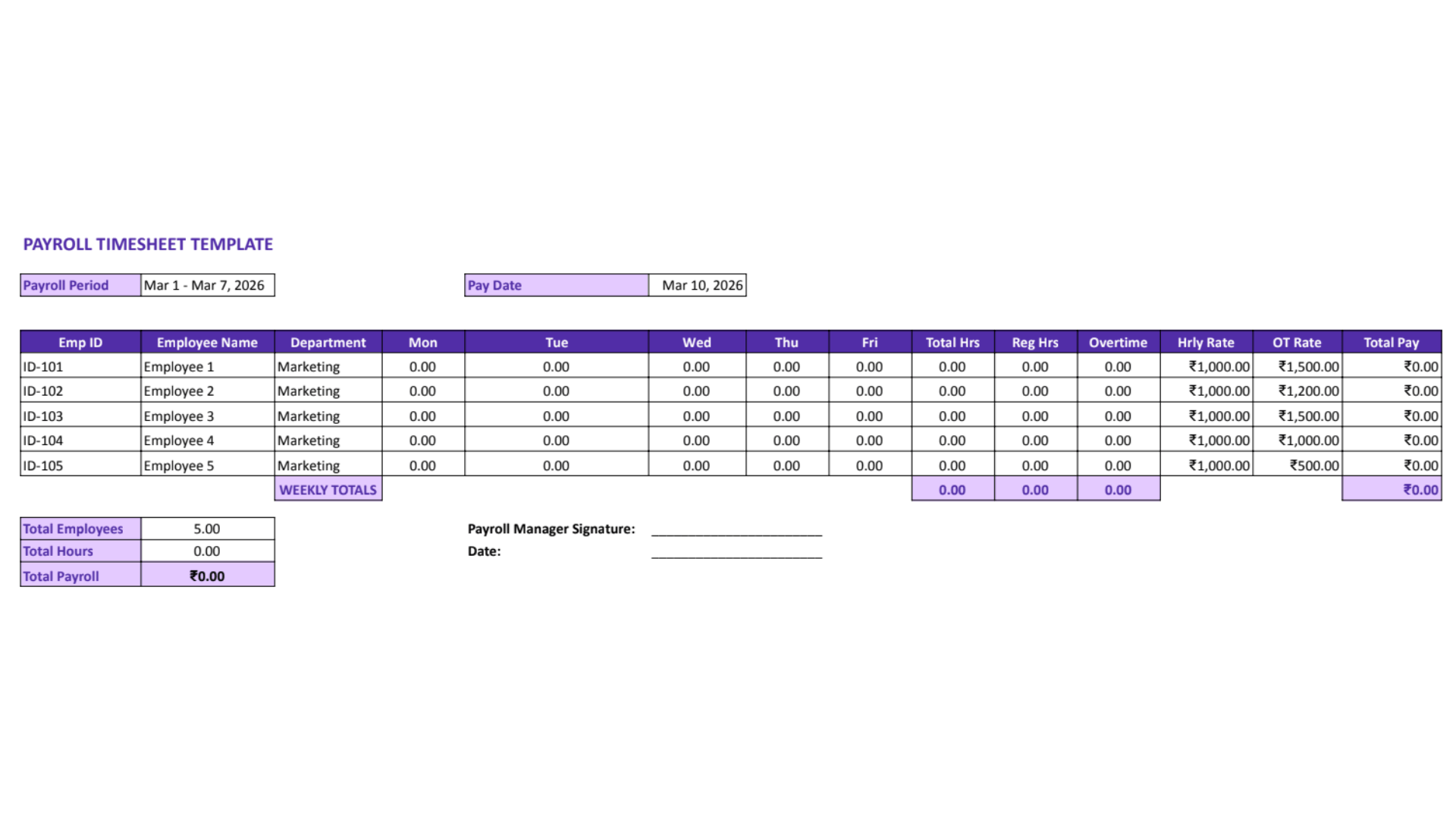
A payroll timesheet template helps ensure accurate work-hour tracking for salary and wage calculations.
Best for:
- Payroll teams
- HR operations
- Small businesses
- Pre-payroll review and approvals
What this template helps you do:
- Calculate regular and overtime hours
- Review attendance before payroll
- Prepare approval-ready records
- Support accurate compensation processing
Key features (Excel & Google Sheets):
- Automatic overtime calculation
- Payroll-ready layout
- Clear regular vs overtime breakdown
- Easy export for payroll workflows
Download Payroll Timesheet Template (Excel, Sheets, Word, PDF)
Instant download • No signup required
How To Use Timesheet Templates
A good template only helps if the process around it is clear.
Here is a simple way to use timesheet templates correctly:
1. Choose the right template first
Do not start with the format. Start with the use case.
Ask:
- Are you tracking attendance?
- Payroll?
- Project hours?
- Daily shifts?
- Monthly summaries?
That decision will save you a lot of rework later.
2. Fill in employee and date details clearly
Every timesheet should show:
- who the sheet belongs to,
- the time period covered,
- and the relevant department, project, or client if needed.
3. Record work hours consistently
Encourage people to log hours as close to real time as possible. End-of-week guesswork creates errors, especially in busy teams.
4. Include breaks and overtime
If breaks and overtime matter for payroll or compliance, make sure the template captures them clearly.
You can also use a free timesheet calculator to quickly calculate total hours, break deductions, overtime, and pay. It helps verify totals before payroll or reporting, especially when teams are logging hours manually.
5. Review before final submission
Before using the sheet for payroll, approval, or reporting, check for:
- missing entries,
- incomplete days,
- unusual totals,
- and errors in overtime or break fields.
6. Save or export in the right format
Use Excel or Google Sheets while the file is still active and editable. Use PDF when the file is final, signed, or being shared as a record.
Excel vs Word vs PDF vs Google Sheets: Which Format Should You Choose?
Here’s the simplest way to think about it.
| Format | Best For | Main Advantage | Limitation |
|---|---|---|---|
| Excel | Calculations and reusable tracking | Auto totals and formulas | Less collaborative than cloud tools |
| Word | Manual entry and simple editing | Easy to edit and print | No built-in calculations |
| Printing, signatures, final records | Fixed, shareable format | Harder to edit | |
| Google Sheets | Collaboration and cloud access | Easy sharing and team use | Can get messy without clear permissions |
There is no universal best option here. The right format depends on how your team works.
Common Problems with Manual Timesheet Templates
Free templates are useful. They are also limited.
That is not a criticism. It is just the reality of manual systems.
Manual entry errors
People forget to enter hours, enter them late, or round numbers in ways that reduce accuracy.
That risk is bigger than it looks. According to ADP, a recent study found that 94% of business spreadsheets contain critical errors . For teams relying on manual timesheet templates, even small spreadsheet mistakes can create bigger problems in payroll, reporting, and compliance.
Missed hours and incomplete records
This happens a lot more than managers think. Small gaps become bigger reporting problems later.
In July 2024, the U.S. Department of Labor recovered more than $555,000 in overtime back wages for 2,607 Intuit employees after finding recordkeeping errors that led to incorrect overtime payments.
Even minor gaps in time tracking can lead to significant financial and compliance risks over time.
Version control issues
If you have ever seen “Timesheet_Final_v3_Updated_UseThisOne.xlsx,” you already know the problem.
No real-time visibility for managers
Templates are good for recordkeeping. They are not always good for fast decision-making.
Reporting gets harder as teams grow
This is the tipping point. What feels simple for one person often becomes messy for five people and frustrating for twenty.
That growing coordination burden shows up in broader workplace data too. Asana’s 2025 research found that knowledge workers spend 60% of their time on “work about work” — including chasing updates, searching for information, and switching between tools. When timesheet tracking becomes too manual or fragmented, it often adds to that overhead instead of reducing it.
I’ve seen teams stay with manual timesheets much longer than they should because the system felt “good enough.” But once reporting starts taking more effort than the insight it gives you, the template is no longer helping. It is becoming admin overhead.
When Free Timesheet Templates Are Enough — and When You Need More
This is the part people often skip, but it matters.
Use templates if…
- you are a freelancer or solo user,
- your team is very small,
- you only need basic records,
- manual entry is manageable,
- and you do not need live reporting.
Move beyond templates if…
- multiple employees are logging hours,
- managers need faster reporting,
- payroll errors are becoming costly,
- remote or hybrid teams need better visibility,
- or you want less manual effort and better accuracy.
One of the clearest lessons I’ve learned over the years is this: templates are great for getting started, but they rarely scale gracefully. They solve the first problem well. They usually do not solve the fifth one.
How Mera Monitor Helps Beyond Manual Timesheet Templates
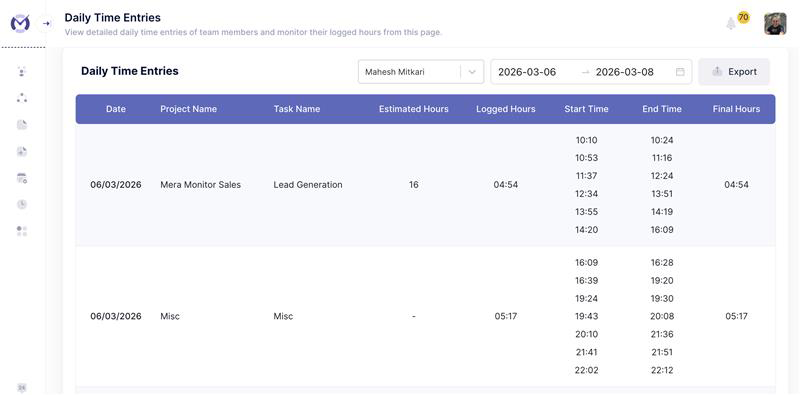
Free timesheet templates are a great starting point. But once a team grows, the real problem usually shifts from “how do we log hours?” to “how do we reduce manual work and get better visibility?”
That is where a tool like Mera Monitor becomes a practical next step.
Instead of depending completely on manual entry, teams can move toward:
- less admin effort,
- clearer work-hour visibility,
- better reporting for managers,
- and a setup that fits remote, hybrid, and in-office teams more naturally.
This is not about saying templates are bad. They are not. They are useful, familiar, and easy to start with. But when the business needs more accuracy, better oversight, and less spreadsheet maintenance, software starts to make more sense.
Final Thoughts
The best timesheet template is not the one with the most fields. It is the one that fits the way your team works.
Start simple. Pick the right format. Use only the fields you really need. And review the sheet regularly enough that it supports decisions, not just recordkeeping.
That is the real goal.
Templates are a great place to begin. But if your team eventually needs less manual effort, better reporting, and clearer visibility across work hours and productivity, it may be time to move from a static template to a more scalable system.