
Introduction
Work doesn’t pause when the internet drops.
And it definitely doesn’t pause when work happens away from a laptop — in meetings, client visits, trainings, or field locations.
Yet this is exactly where many teams lose hours, accuracy, and eventually trust. That’s why offline time tracking is no longer a “nice to have.” For many businesses, it’s a core requirement.
If you’ve ever dealt with:
- Missing time entries
- Payroll disputes
- “I forgot to log it” conversations
- Inconsistent timesheets
- Or project hours that don’t match the actual workload
then you’ve already seen the consequences of not having reliable offline time tracking software or a consistent policy around offline work.
In this guide, we’ll break down offline time tracking meaning , the real benefits, how it works behind the scenes, the most common implementation mistakes, and how to choose the right offline time tracking app for your team. Along the way, I’ll also share a few “what actually works in real companies” insights (the stuff you don’t usually find in product pages).
Offline Time Tracking Meaning (There Are Two Practical Definitions)
Most pages explain offline time tracking in just one way. In reality, teams run into two different “offline” situations — and you’ll want your tracking approach to cover both.
1) Offline Because There’s No Internet (Sync Later)
This is the technical definition most people mean when they search offline time tracking .
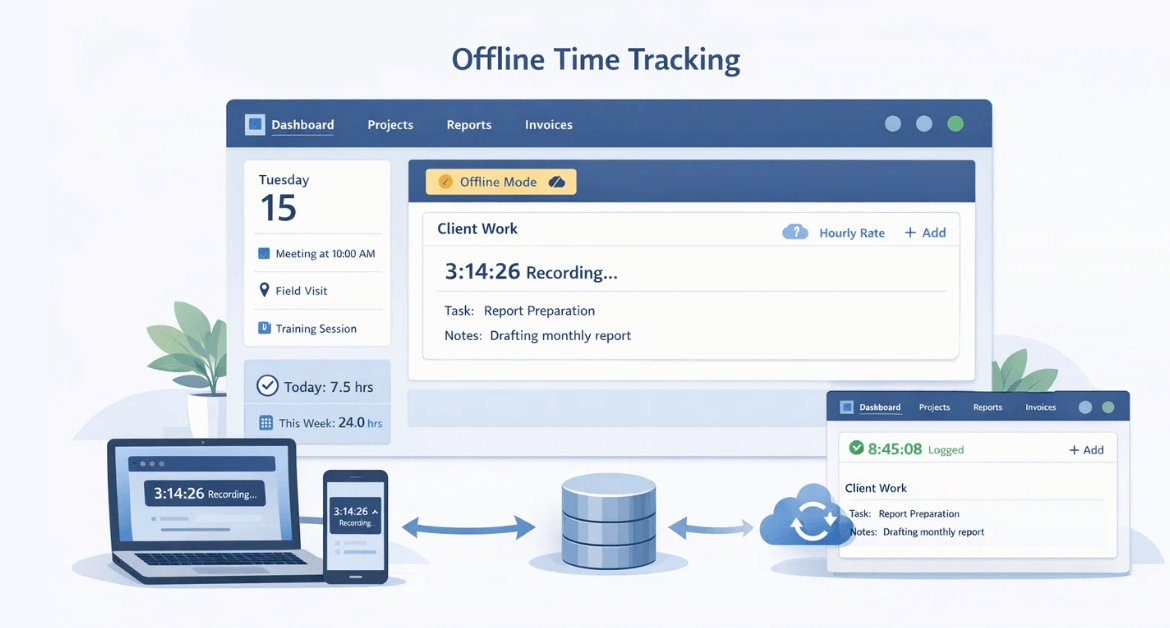
Offline time tracking allows employees to:
- Clock in or start a timer without internet
- Store entries locally on the device
- Automatically sync the data when connectivity returns
This matters a lot for:
- Field teams (construction, on-site service, delivery)
- Remote employees in low-connectivity areas
- Traveling team members (airports, hotels, client sites)
- Warehouses and facilities with weak Wi-Fi pockets
Without offline capability, time goes missing — and missing time doesn’t stay small. It becomes payroll fixes, billing disputes, and distrust.
2) Offline Because Work Happens Away from the Computer
Not all work shows up as “app activity.”
Meetings. Workshops. Client discussions. Training sessions. On-site visits. Internal brainstorming. Documentation done on paper.
These are legitimate productive hours — but they don’t always generate trackable computer activity. So in practice, offline time tracking also means:
The ability to log real work that happens outside automatic digital tracking — without creating loopholes.
Most modern teams need both definitions covered: offline without internet , and offline away from device .
Why Offline Time Tracking Matters
At first glance, offline tracking sounds like a technical feature.
In reality, it’s a business stability feature .
1) It Prevents Missing Hours (and Quiet Revenue Leakage)
Connectivity drops are common. Field work is unpredictable. Manual logging is unreliable.
According to the U.S. Bureau of Labor Statistics (BLS), approximately 34% of employed people worked from home at some point in 2023. As hybrid and remote work continue to expand, the risk of connectivity-related time gaps increases — especially when teams rely solely on online time tracking systems.
Offline time tracking software ensures time entries don’t disappear just because internet access isn’t perfect.
Over years of working with remote and hybrid teams, I’ve seen the biggest payroll disputes come not from “tracked work” — but from unrecorded offline hours. Small gaps (15–30 minutes here and there) quietly compound into big inconsistencies by month-end.
2) It Improves Payroll and Billing Accuracy
If your organization:
- Bills clients hourly
- Tracks billable vs non-billable time
- Pays overtime
- Runs shift-based operations
…then offline gaps directly hit money and trust.
A survey referenced by Ernst & Young (EY) found that one in five payrolls in the United States contains errors , and that each error costs an average of . When time entries go missing (especially from offline work), corrections add up quickly — in cost, admin effort, and employee frustration.
When you can track time offline and sync later , you reduce manual fixes and “he said/she said” disputes.
3) It Strengthens Compliance and Audit Readiness
Good offline tracking isn’t just about storing time. It ensures:
- Entries are timestamped correctly
- Edits are logged
- Approvals are recorded
- Sync conflicts are resolved
This is where many “basic” tools fall short. They capture offline time — but don’t provide control and traceability when records get edited later.
4) It Enables Better Planning and Coaching (Without Micromanagement)
Once offline time is reliably captured, you can spot patterns:
- Teams consistently missing time entries
- Projects under-estimated
- Too much time spent in meetings vs execution
- Field travel time eating into billable hours
Offline tracking becomes a foundation for fairer planning — not surveillance.
How Offline Time Tracking Works (Step-by-Step)
Let’s simplify how an offline time tracking app typically works.
The basic flow
- An employee clocks in, clocks out, or runs a timer while offline
- The time entry is stored locally on the device (mobile or desktop)
- When internet returns, the app syncs automatically
- The system validates rules (shifts, breaks, overlaps)
- A manager reviews and approves for payroll/billing reports
That’s the simple version.
But here’s what separates “it works in a demo” from “it works in the real world.”
What good offline time tracking also includes
In real operations, offline time creates messy scenarios:
- Duplicate entries (same person logs from multiple devices)
- Overlaps (timer + manual entry for the same period)
- Device clock changes (intentionally or accidentally)
- Time-zone changes during travel
- Late syncs near payroll deadlines
In real deployments, teams rarely struggle with starting the timer. They struggle with reconciliation. If a system can’t detect duplicates, overlaps, and sync conflicts, you end up with “clean-looking reports” built on unreliable data.
So when you evaluate offline tracking, ask: What happens when data comes in late, duplicated, or conflicting? That’s the real test.
Offline Time Tracking Use Cases
Offline time tracking for field employees
A service technician starts work at a client site with poor network coverage. They clock in offline and log travel + service time. The data syncs later — without losing a minute.
Offline time tracking for remote teams
An employee’s Wi-Fi drops mid-day. They keep working. When the connection returns, the tool syncs entries so timesheets don’t develop gaps.
Offline work tracking for meetings, trainings, and on-site sessions
A manager is in back-to-back meetings and workshops. Those hours are real work, but not visible in app activity. Offline work blocks allow clean logging without creating reporting blind spots.
Offline Time Tracking Methods (Pros and Cons)
Not all offline time tracking methods work the same way. Some are built for field teams. Others for desk-based knowledge workers. Some reduce friction. Others quietly increase administrative overhead.
The right choice depends on:
- Your team structure
- Work environment
- Compliance requirements
- Payroll complexity
- Level of reporting you need
Let’s break down the most common offline time tracking methods — with realistic pros and trade-offs.
1. Mobile Offline Clock-In / Clock-Out
This is the most common offline time tracking app setup for field or shift-based teams.
Employees use a mobile app to:
- Clock in offline
- Clock out offline
- Log breaks
- Add shift notes
- Sync later when internet returns
Best for:
- Construction
- Field service teams
- Logistics & delivery
- Warehouses
- On-site operations
- Retail chains with connectivity gaps
Pros:
✔ Simple and fast adoption
✔ Works in low-connectivity areas
✔ Reduces manual timesheet entry
✔ Supports shift-based operations
✔ Easy integration with payroll
Cons:
⚠ Relies heavily on policy enforcement
⚠ Can be misused if approvals are weak
⚠ GPS/location tracking must be clearly communicated
⚠ Doesn’t show work context (only time presence)
Practical Advice:
If you use mobile offline clock-in, combine it with:
- Approval workflows
- Edit windows
- Audit trails
- Clear attendance rules
Time capture alone is not control. Process is.
2. Desktop-Based Offline Tracking (Auto Capture Mode)
Some tools continue tracking activity even when internet disconnects. Once connectivity returns, the system syncs usage data automatically.
This is common for remote or hybrid knowledge workers.
Best for:
- IT teams
- Software development
- Digital agencies
- Back-office operations
- Remote-first companies
Pros:
✔ Reduces dependency on manual entry
✔ Captures activity continuity
✔ Useful for productivity trend analysis
✔ Helps identify work distribution patterns
Cons:
⚠ Requires transparent communication about what is tracked
⚠ Can create privacy concerns if poorly introduced
⚠ Needs strong data reconciliation during sync
⚠ Doesn’t capture offline meetings automatically
Real-World Insight:
Desktop offline tracking works well when positioned as: “Operational visibility,” not “surveillance.”
When employees understand:
- What data is captured
- What is not captured
- Who sees it
- Why it’s used
Adoption improves significantly.
3. Manual Offline Time Entries (Reconstruction Method)
This is the simplest method — but also the most error-prone.
Employees manually add time entries later when internet becomes available.
Example:
- “Client meeting – 2 hours”
- “Site visit – 3 hours”
- “Training session – 1.5 hours”
Best for:
- Occasional offline blocks
- Professional services
- Consulting
- Low-volume offline work
Pros:
✔ Flexible
✔ Low technical dependency
✔ Easy to implement
Cons:
⚠ High risk of forgotten entries
⚠ Time estimation errors
⚠ Easy to inflate or underreport
⚠ Creates payroll inconsistencies
⚠ Increases managerial verification workload
Practical Advice:
Manual entries should:
- Require manager approval
- Be restricted by date window
- Include notes or task mapping
- Be flagged if exceeding threshold limits
Manual offline logging should be controlled — not unlimited.
4. Offline Kiosk or Shared Terminal Systems
In physical environments, teams may use shared devices or kiosks for clock-in/out.
This system allows employees to:
- Punch in offline
- Punch out offline
- Sync centrally later
Best for:
- Factories
- Manufacturing units
- Warehouses
- Hospitals
- Educational institutions
- Retail chains
Pros:
✔ Standardized entry point
✔ Reduces personal device dependency
✔ Easy for shift-based environments
✔ Controlled access point
Cons:
⚠ Risk of buddy punching
⚠ Requires identity validation
⚠ Limited to attendance-level tracking
⚠ Doesn’t capture task-level insights
Implementation Tip:
If using kiosks:
- Add identity verification
- Combine with approval workflows
- Link to project/task structure where possible
Attendance tracking alone is not operational insight.
5. Hybrid Model (Most Mature Setup)
In growing organizations, the most reliable structure is a hybrid offline time tracking system , combining:
- Desktop tracking for knowledge work
- Mobile offline clock-in for field teams
- Manual offline entries for meeting blocks
- Structured approvals for consistency
This approach ensures:
- No connectivity gap causes missing time
- No meeting time disappears
- No payroll disputes escalate
- No reporting blind spots remain
This is where structured platforms outperform standalone time apps.
Common Problems With Offline Time Tracking
Problem 1: “Offline time gets abused”
Yes, it can.
But most abuse is a policy + workflow failure, not a software problem.
Actionable fixes:
- Require manager approval for offline entries beyond a threshold
- Set edit windows (example: edits allowed only within 48 hours)
- Lock payroll periods after processing
- Maintain an audit trail of changes
From experience, strict enforcement without clear communication creates pushback. The most successful implementations combine controls (approvals + audit logs) with transparency — so employees feel protected, not suspected.
Problem 2: Sync delays causing payroll cut-off issues
Actionable fixes:
- Define a sync cut-off before payroll close
- Set automated reminders
- Use a dashboard that shows “unsynced entries” clearly
Problem 3: Duplicate entries and overlaps
Actionable fixes:
- Enforce conflict detection
- Auto-flag overlaps
- Require review for anomalies
Problem 4: Privacy concerns and trust breakdown
Actionable fixes:
- Tell employees exactly what is tracked and what isn’t
- Keep data access role-based
- Use monitoring data for coaching and support (not “gotcha” culture)
What to Look for in Offline Time Tracking Software
If you’re choosing offline time tracking software , use this checklist.
Must-have
- Offline capture (mobile/desktop)
- Auto sync when online
- Conflict handling (duplicates/overlaps)
- Approval workflows
- Audit trail (edits + approvals)
- Secure local storage + role-based access
Nice-to-have (depends on your workflow)
- Project/task mapping
- Billable vs non-billable tracking
- Productivity reporting layered on top
- Export-ready payroll and billing reports
- Optional location validation for field teams
Offline Time Tracking vs Online Time Tracking
Many teams assume time tracking is binary — either you track time or you don’t.
In reality, there are two operational models:
- Online time tracking
- Offline time tracking
Understanding the difference isn’t just technical. It affects payroll accuracy, reporting reliability, compliance readiness, and overall operational clarity.
Let’s break this down properly.
Online Time Tracking
Online time tracking works only when there is an active internet connection.
The system:
- Captures clock-ins
- Records activity
- Syncs data instantly to the cloud
- Updates dashboards in real-time
If the connection drops, tracking often pauses or fails entirely.
Best suited for:
- Stable office environments
- Teams working from fixed locations
- Organizations with consistent internet access
- Light monitoring or attendance tracking
Advantages of Online Time Tracking
✔ Real-time visibility
✔ Instant dashboard updates
✔ Easier centralized monitoring
✔ Lower device storage dependency
✔ Simple architecture
Limitations of Online Time Tracking
⚠ Time gaps during connectivity loss
⚠ Missing entries if the browser closes
⚠ No backup during internet failure
⚠ Higher risk of incomplete timesheets
⚠ Field teams struggle with reliability
Online tracking works well — until it doesn’t.
The moment connectivity becomes inconsistent, data integrity starts to suffer.
Gartner reported that 82% of company leaders planned to allow employees to work remotely some of the time . When remote or hybrid work is an accepted operating model, relying on online-only time tracking increases the risk of incomplete records — which is why offline-capable tracking is often the more resilient baseline.
Offline Time Tracking
Offline time tracking allows employees to record work hours even when there is no internet connection. The data is stored locally and synced once connectivity is restored.
Offline tracking supports:
- Clock-in/out without internet
- Offline timer continuation
- Manual offline work blocks
- Sync reconciliation once online
Best suited for:
- Field operations
- Remote and hybrid teams
- Traveling employees
- Distributed organizations
- Low-connectivity regions
- Teams with frequent network interruptions
Advantages of Offline Time Tracking
✔ No loss of time data due to connectivity issues
✔ Reliable attendance continuity
✔ Better payroll accuracy
✔ Supports real-world work environments
✔ Enables hybrid flexibility
Limitations of Offline Time Tracking
⚠ Requires robust sync management
⚠ Needs conflict detection (duplicates/overlaps)
⚠ Demands structured approval workflows
⚠ Slightly more complex system design
Offline tracking isn’t just a backup feature — it’s an operational safeguard.
The Real Difference: Reliability vs Convenience
Online tracking prioritizes convenience and simplicity.
Offline tracking prioritizes continuity and reliability.
If your organization:
- Depends on accurate payroll
- Bills clients hourly
- Operates across multiple locations
- Runs shift-based teams
- Has distributed remote employees
Then reliability becomes more important than simplicity.
Best Practices to Implement Offline Time Tracking
1) Start with a pilot
Pick one team. Run it for 2–3 weeks. Track:
- Adoption
- Missing entries
- Sync issues
- Approval friction
2) Define clear rules
Clarify:
- What counts as offline work?
- When are manual edits allowed?
- Who approves what?
- What’s the payroll cut-off?
3) Communicate the “why” in human terms
Explain:
- It protects payroll accuracy
- It reduces disputes
- It supports fair planning
- It captures real work that otherwise gets ignored
After years of implementing tracking systems, one pattern stays consistent: phased rollout (pilot → feedback → expand) reduces resistance dramatically compared to sudden “company-wide enforcement.” People accept systems faster when they feel involved.
Where Mera Monitor Fits
Offline time tracking fixes a big problem: missing time .
But once time is captured, leaders still need context:
- Where did the time go across projects and work categories?
- Is offline time consistent with workload patterns?
- Are teams overloaded or underutilized?
- Where can coaching improve performance without pressure?
That’s where Mera Monitor fits naturally — not as “just another tracker,” but as a way to turn time + activity signals into clearer, more actionable insights for remote, hybrid, and field teams.
If offline time tracking helps you capture continuity, Mera Monitor helps you turn that continuity into clarity — for planning, coaching, and reporting.
Final Thoughts
Offline time tracking isn’t just about working without internet — it’s about ensuring work never becomes invisible.
As teams move between office, home, field locations, and meetings, relying only on online tracking creates gaps. Those gaps turn into payroll issues, reporting inconsistencies, and leadership blind spots.
The goal isn’t tighter control. It’s continuity and clarity.
When time is captured consistently — online and offline — leaders can plan better, teams can report confidently, and operations run with fewer surprises.
And once that continuity is in place, platforms like Mera Monitor help transform raw time data into structured insights that support smarter decisions — without adding friction to how teams work.
FAQs
Offline time tracking is the ability to record work hours without an internet connection, store them locally, and sync them automatically when online again.
The tool captures clock-ins, timers, or work entries offline, stores them on the device, and syncs them to the central system when internet returns, often with validation and approval steps.
Yes. Many tools offer mobile offline clock-in/out, allowing field employees to track time even in low connectivity.
It can. Offline time tracking may include “offline work blocks” like meetings, trainings, workshops, and client visits—work that doesn’t always show up in digital activity logs.
By using approval workflows, audit trails, edit restrictions, anomaly flags (overlaps/duplicates), and clear policies defining what counts as offline work.
Look for offline capture, auto-sync reliability, conflict handling, approvals, audit logs, role-based access, and reporting that fits payroll/billing needs.