Quick Picks: Top Workforce Analytics Tools
Not every workforce analytics tool is built for the same purpose. If you’re short on time, here’s a quick shortlist based on common use cases:
- Mera Monitor — Ideal for real-time workforce visibility and productivity insights
- ActivTrak — Ideal for deep analytics and benchmarking
- Insightful — Works well for remote team productivity tracking
- Time Doctor — Works well for time tracking and accountability
- Deel HR — Ideal for global workforce and HR analytics
These picks are based on how teams typically use these tools in real scenarios. If you already know your main need, this shortlist can help you narrow down your options quickly.
Introduction
Most teams today don’t struggle with effort—they struggle with visibility.
Work is happening. People are busy. Projects are moving. But when you ask simple questions like:
- Where is time actually going?
- Why is one team ahead while another is stuck?
- What’s actually productive vs just “activity”?
The answers are often unclear.
Microsoft and LinkedIn’s 2024 Work Trend Index found that 68% of people struggle with the pace and volume of work , while 46% feel burned out . That makes workforce visibility more than a reporting need—it becomes a way to understand where work pressure is building before it affects output.
That’s where workforce analytics software becomes useful—not as a tracking tool, but as a way to see how work really happens and make better decisions around it.
In my experience working with distributed teams, the issue is rarely effort—it’s clarity. Teams are working, but leaders don’t always see where time is going or where things are slowing down.
How We Evaluated These Workforce Analytics Tools
Instead of just listing features, we looked at what actually helps teams make better decisions .
Here’s what we evaluated:
- Workforce visibility: Can you clearly see how work is happening?
- Productivity insights: Does it show trends, patterns, and gaps?
- Reporting depth: Are insights actionable or just raw data?
- Ease of use: Can teams adopt it without friction?
- Privacy & access controls: Can you manage visibility responsibly?
- Team fit: Remote, hybrid, enterprise, SMB
- Real-world usability: Does it help in day-to-day decisions?
One thing I’ve seen repeatedly is that tools with long feature lists don’t necessarily deliver better outcomes. What matters is how clearly the tool helps you connect workforce data to real decisions—like improving utilization or identifying bottlenecks.
Quick Comparison: Best Workforce Analytics Software for 2026
Workforce visibility & productivity insights
Real-time analytics + work visibility
$4/user/month
Productivity analytics
Deep dashboards & benchmarking
$10/user/month (billed annually)
Remote teams
Workforce productivity tracking
$10/user/month
Time tracking + analytics
Detailed reports
$8/user/month
Field & remote teams
Time + payroll integration
$7/user/month
Security-focused analytics
User behavior tracking
Approx. $14.66/5 users/month
Workforce + project tracking
Productivity + reporting
Approx. $4/user/month
SMB productivity tracking
Screenshots + monitoring
Custom
Time tracking teams
Simple tracking + reports
$4.99/user/month
Global workforce
HR analytics + compliance
$5/user/month
Top 10 Workforce Analytics Software for 2026
1. Mera Monitor
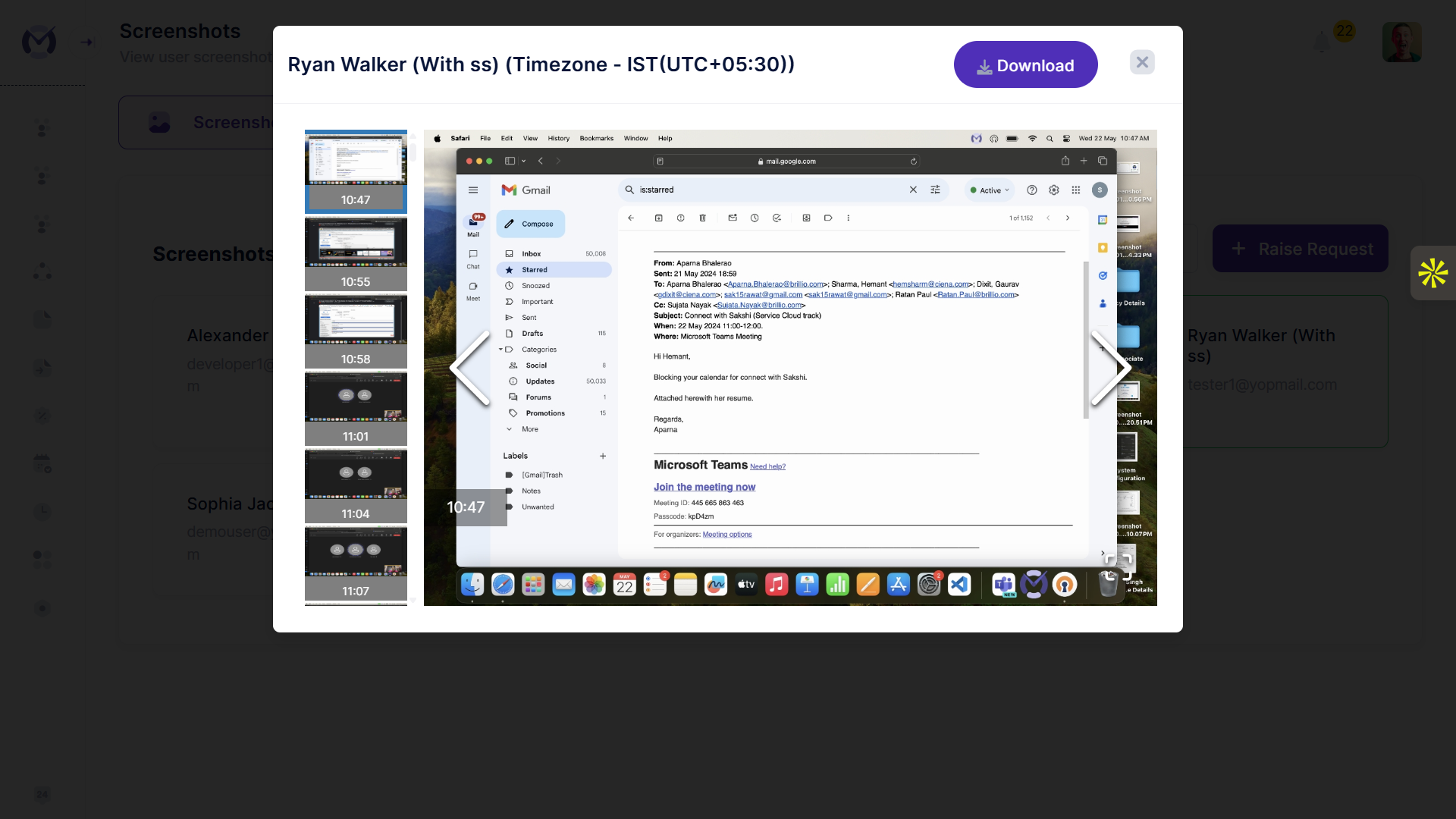
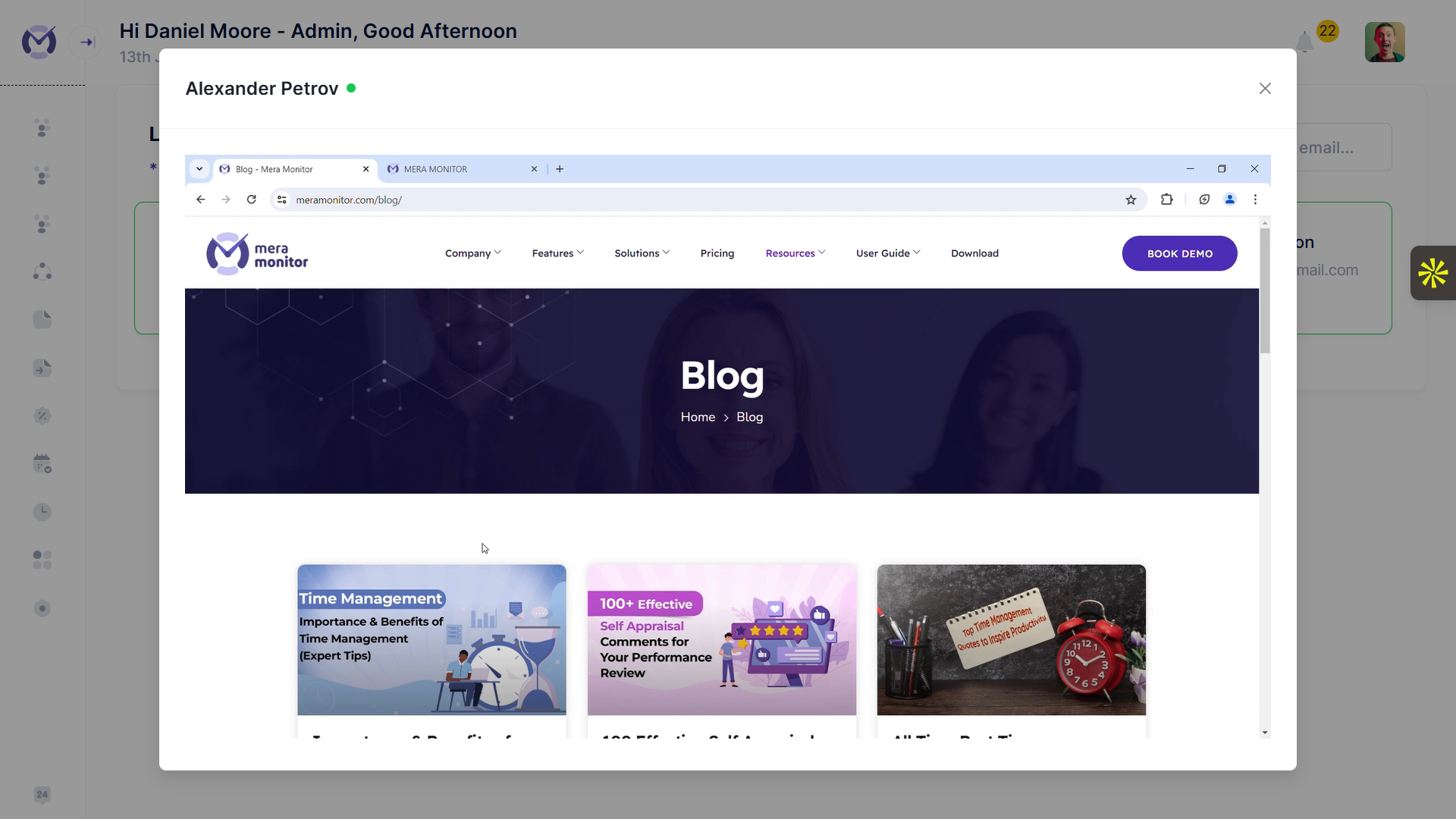
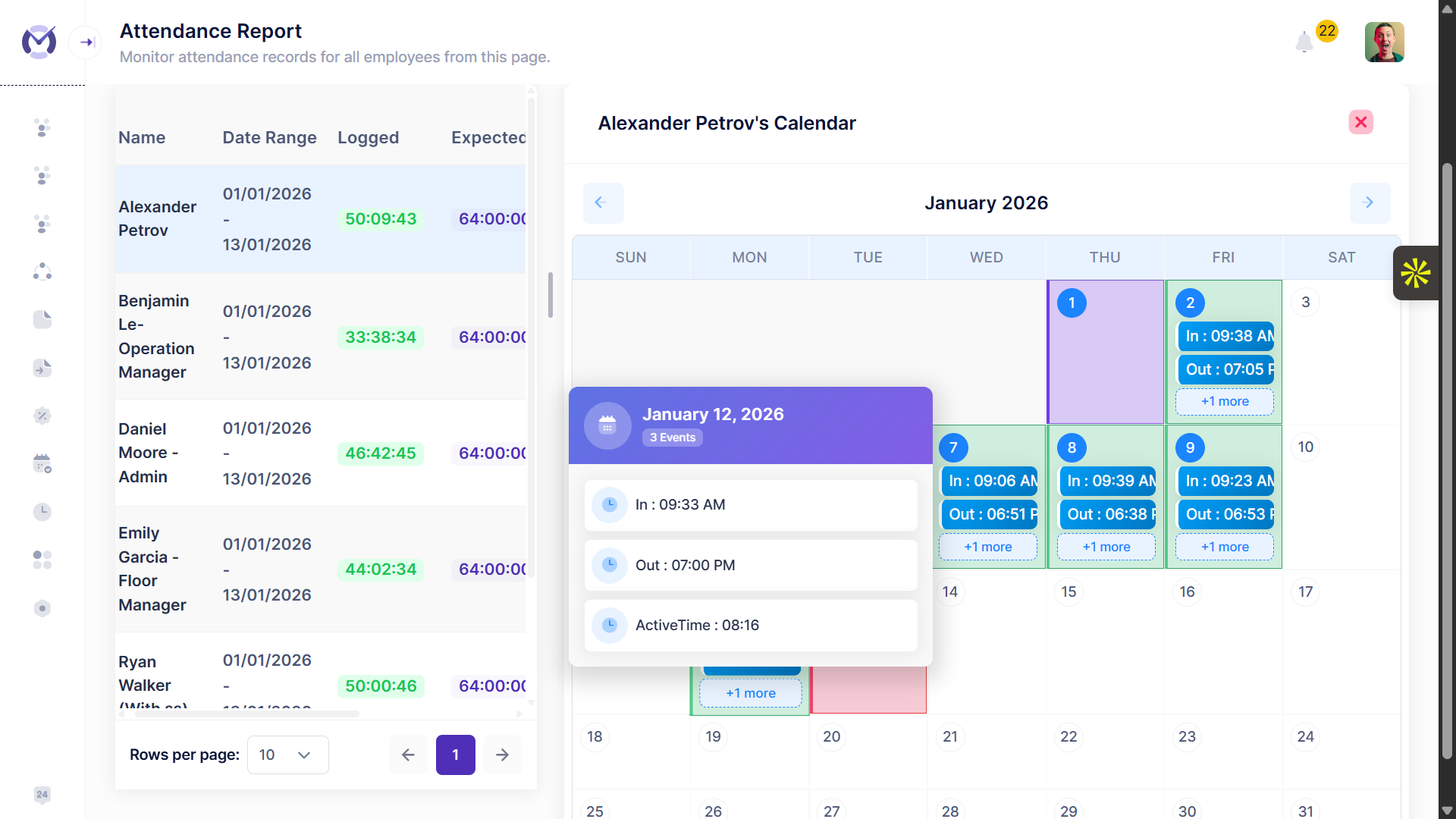
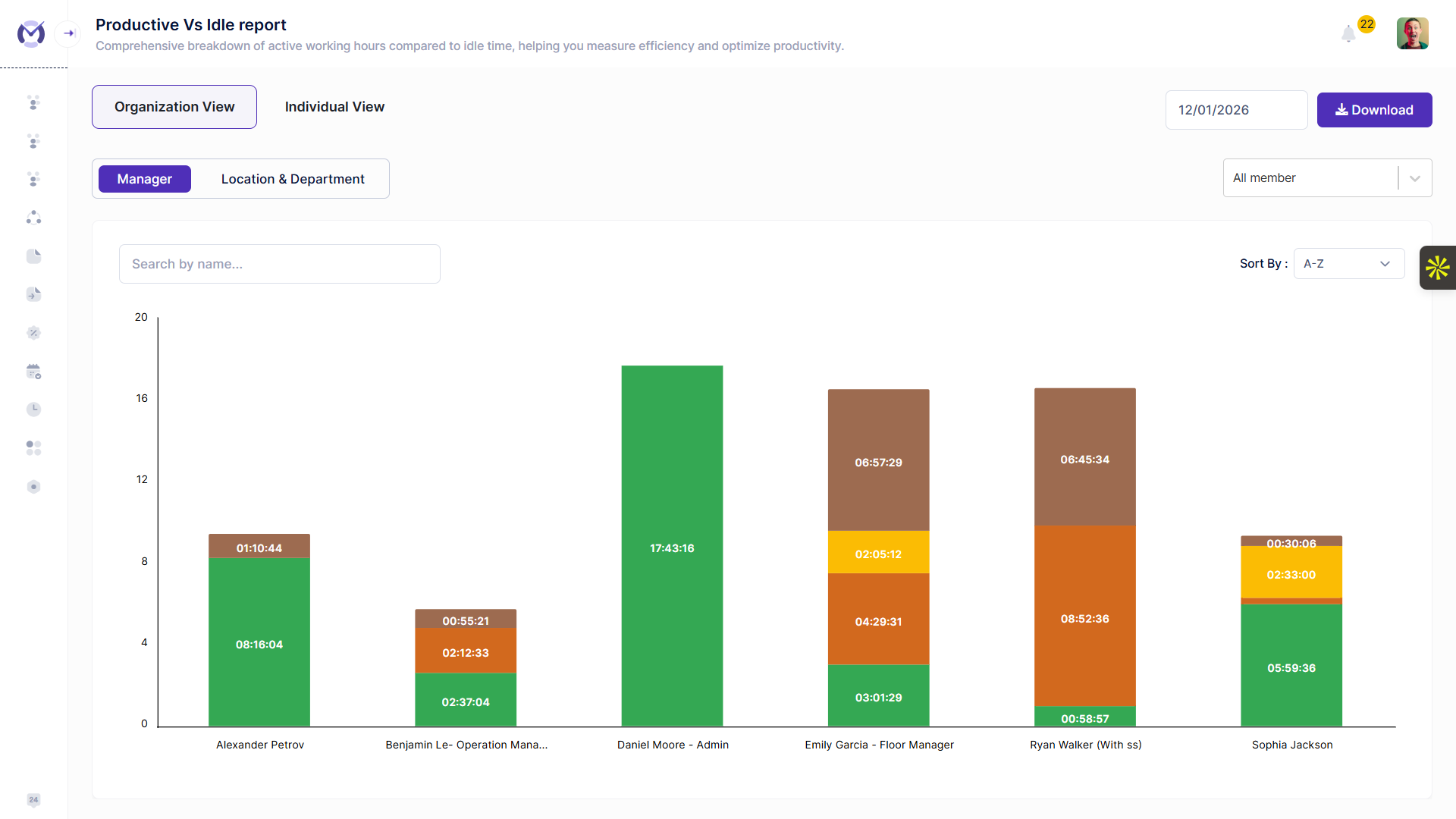
Ideal for: Teams that need real-time workforce visibility and productivity insights
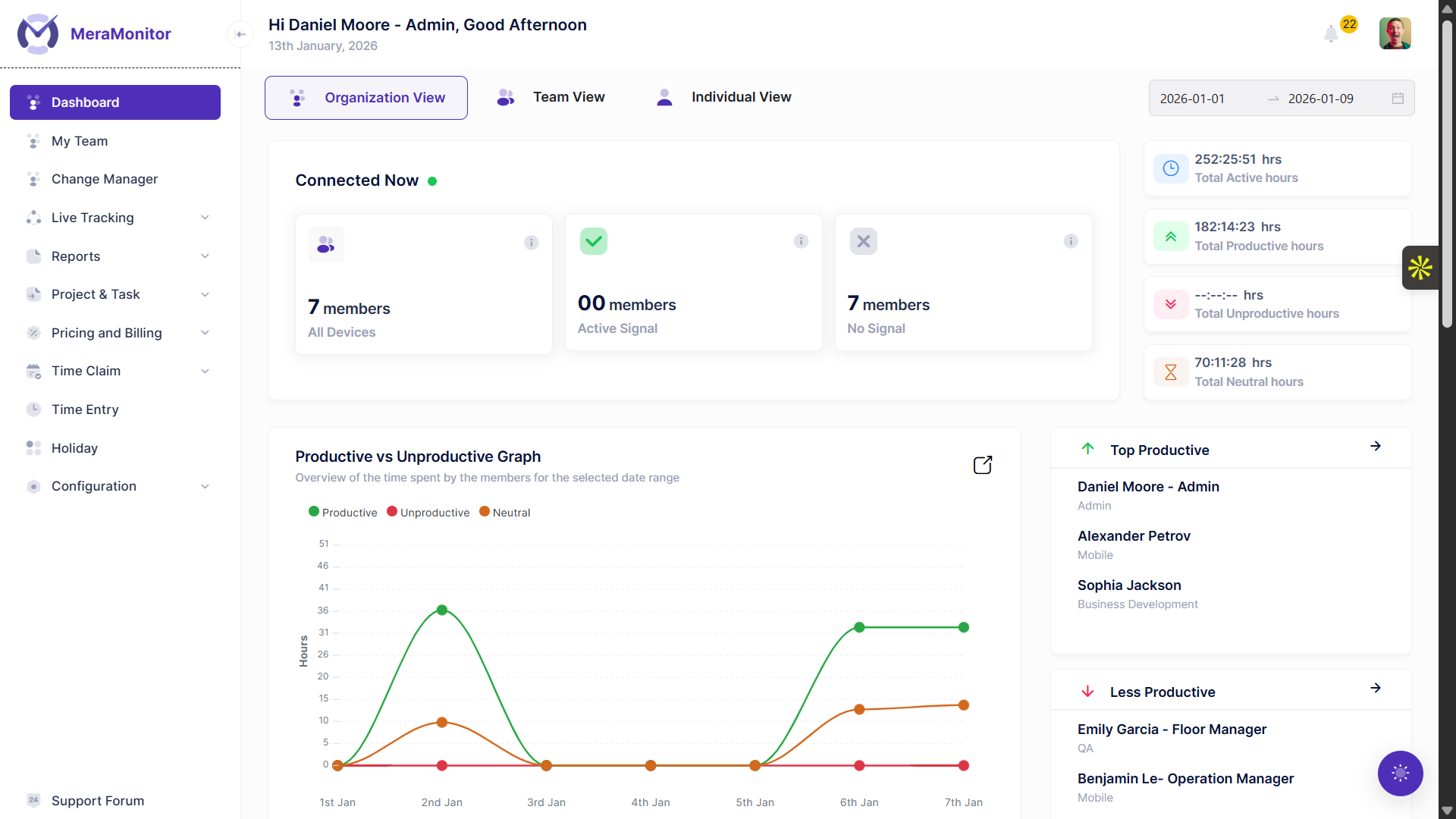
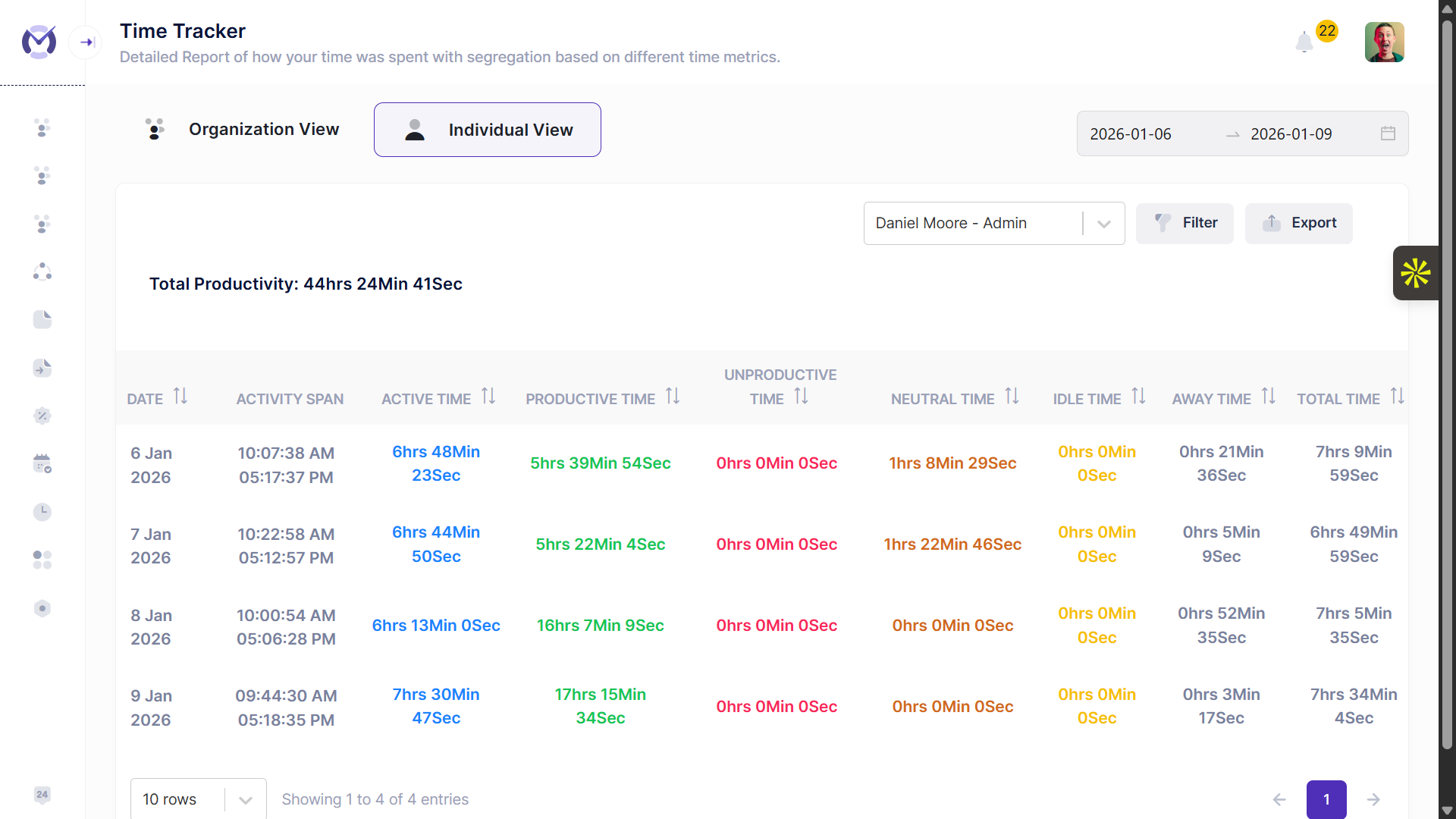
Overview: Mera Monitor is designed for teams that want to go beyond tracking and actually understand how work is happening. It brings together time data, activity insights, and productivity patterns into a single, real-time dashboard. Instead of waiting for reports at the end of the day or week, leaders can see what’s happening as work unfolds and act faster.
What stands out is how it connects individual activity with overall team performance , helping managers identify not just what happened—but why.
Key features:
- Real-time dashboard with live workforce view
- Productivity analytics ( active vs idle patterns)
- App & website usage classification
- Screenshot-based work context
- Role-based access for controlled visibility
Pros:
- Clear visibility across teams and projects
- Helps connect data directly to decisions
- Balanced approach between monitoring and privacy
Cons:
- Requires initial setup to align with team workflows
- May feel more than needed for very small teams
Choose this if: You want to move from “tracking work” to understanding and improving how work happens .
To see whether this fits your team’s workflow, explore Mera Monitor through a free trial or book a demo for a guided walkthrough.
Here’s a quick walkthrough to see how Mera Monitor’s dashboard, productivity insights, and workforce visibility come together in practice.
2. ActivTrak
Ideal for: Deep workforce analytics and benchmarking
Overview: ActivTrak is built for organizations that rely heavily on data to manage performance. It focuses on giving structured insights through dashboards, benchmarks, and productivity scoring. Teams can analyze trends across departments and identify patterns over time.
It’s especially useful for organizations that want to compare performance across teams or track long-term improvements.
Key features:
- Productivity dashboards and scoring
- Workforce behavior insights
- Benchmarking across teams
- Trend-based reporting
Pros:
- Strong analytics depth
- Useful for long-term performance tracking
Cons:
- Slight learning curve
- May feel data-heavy without clear action planning
Choose this if: You want structured, report-driven workforce analytics for decision-making.
3. Insightful
Ideal for: Workforce analytics with a focus on productivity trends and operational visibility
Overview: Insightful positions itself as a workforce analytics platform that helps organizations understand how work is distributed across teams, tools, and time. It focuses on providing visibility into productivity patterns, activity trends, and real-time work behavior.
The platform is designed to give leaders a structured view of workforce data, helping them identify inefficiencies, monitor performance over time, and support operational decision-making.
Key features:
- Workforce analytics dashboards with productivity trends
- App and website usage insights
- Real-time activity tracking
- Time tracking and reporting
Pros:
- Strong focus on workforce analytics and productivity trends
- Provides visibility into how work is distributed
- Supports data-driven operational decisions
Cons:
- Requires interpretation of data to translate insights into actions
- More focused on analytics structure than simplified tracking workflows
Choose this if: You need visibility into workforce patterns and productivity trends to support operational decisions.
4. Time Doctor
Ideal for: Time tracking with productivity analytics
Overview: Time Doctor is widely used by teams that want accountability around time usage. It combines time tracking with basic productivity analytics, helping teams understand how time is spent across tasks and projects.
It’s particularly useful for service-based businesses where tracking billable hours is critical.
Key features:
- Detailed time tracking
- Screenshot monitoring
- Productivity reports
- Distraction alerts
Pros:
- Strong accountability tracking
- Good for billing and client reporting
Cons:
- Primarily focused on time tracking with supporting productivity insights
- More focused on time than insights
Choose this if: Your priority is accurate time tracking with supporting productivity data .
5. Hubstaff
Ideal for: Remote and field teams
Overview: Hubstaff extends workforce tracking beyond desktops. It supports remote teams, freelancers, and field workers by combining time tracking with GPS tracking and payroll integrations.
This makes it useful for businesses where work is happening across different locations, not just on computers.
Key features:
- Time tracking
- GPS/location tracking
- Payroll and invoicing integrations
- Basic productivity analytics
Pros:
- Strong for distributed and mobile teams
- Good integration ecosystem
Cons:
- Focuses more on workforce operations than advanced analytics depth
- Focus leans toward tracking rather than insights
Choose this if: You need tracking across locations with payroll integration .
6. Teramind
Ideal for: Security-focused workforce analytics
Overview: Teramind is designed with security and compliance in mind. While it does offer workforce analytics, its core strength lies in user behavior monitoring and risk detection.
Organizations dealing with sensitive data or strict compliance requirements often use it to monitor potential insider threats.
Key features:
- User behavior analytics
- Security monitoring
- Policy enforcement tools
- Detailed activity tracking
Pros:
- Strong security capabilities
- Useful for compliance-heavy industries
Cons:
- Primarily focused on security, compliance, and user behavior analytics
- Can feel heavy for general use
Choose this if: Your primary concern is security, compliance, and risk monitoring .
7. Workstatus
Ideal for: Workforce + project tracking
Overview: Workstatus combines workforce tracking with project management elements. It helps teams track time, monitor productivity, and align work with project outcomes.
This makes it a practical option for teams that want a single tool for both tracking and basic analytics.
Key features:
- Time tracking
- Project tracking
- Productivity insights
- Reporting dashboards
Pros:
- All-in-one functionality
- Useful for service and project-based teams
Cons:
- Analytics not as deep as specialized tools
- Combines multiple capabilities, which may require some initial familiarization
Choose this if: You want tracking + project visibility in one platform .
After evaluating multiple workforce analytics tools across teams, one pattern becomes clear: most tools are good at collecting data, but far fewer help teams actually act on it. The real value comes from turning that data into insights leaders can use in real time.
8. we360.ai
Ideal for: SMB productivity tracking
Overview: we360.ai is built for small to mid-sized teams that need straightforward visibility into employee activity. It focuses on tracking work hours, capturing screenshots, and identifying productivity levels.
It’s a practical option when simplicity and affordability matter more than advanced analytics.
Key features:
- Time tracking
- Screenshots
- Activity monitoring
- Basic productivity reports
Pros:
- Designed for teams looking for straightforward productivity tracking
- Cost-effective
Cons:
- Limited advanced analytics
- Less flexibility in insights
Choose this if: You need simple productivity tracking without complexity .
9. WebWork Time Tracker
Ideal for: Time tracking and attendance-focused teams
Overview: WebWork is primarily a time tracking tool that includes basic workforce analytics features. It helps teams monitor hours worked, track attendance, and review productivity through simple reports.
It’s more focused on operational tracking than strategic insights.
Key features:
- Time tracking
- Screenshots
- Attendance monitoring
- Basic reports
Pros:
- Simple and straightforward
- Good for tracking billable hours
Cons:
- Primarily focused on time tracking and operational reporting
- Not built for decision-level insights
Choose this if: Your main goal is tracking time and attendance accurately .
10. Deel HR
Ideal for: Global workforce management and HR analytics
Overview: Deel is a global HR platform designed for companies managing international teams. Its workforce analytics capabilities focus more on employee data, compliance, and workforce planning rather than productivity tracking.
It helps businesses manage hiring, payroll, and compliance across countries while offering insights into workforce structure.
Key features:
- HR analytics and reporting
- Payroll and compliance management
- Workforce planning insights
- Global hiring support
Pros:
- Strong for global operations
- Combines HR + analytics
Cons:
- Focuses more on HR analytics and workforce management than productivity tracking
- Limited real-time work visibility
Choose this if: You need HR-driven workforce insights for global teams .
What Is Workforce Analytics Software?
Workforce analytics software helps you make sense of work—not just measure it.
Most teams already have data:
- Timesheets
- Project updates
- Activity logs
But that data is scattered and hard to interpret.
Workforce analytics brings it together and answers practical questions like:
- Where are we losing time?
- Which teams are stretched vs underutilized?
- What’s slowing down delivery?
It’s less about numbers—and more about making those numbers useful .
Organizations that actively use workforce analytics have been shown to reduce employee attrition by up to 30% , as better visibility helps identify and address issues earlier.
Why Workforce Analytics Matters in 2026
Work environments have changed faster than management practices.
Today:
- Teams are hybrid or remote
- Work happens across tools and locations
- Managers don’t have natural visibility anymore
This creates real challenges:
- Work looks busy, but output doesn’t match
- Bottlenecks are discovered too late
- Decisions are based on assumptions
A Deloitte report highlights that 7 out of 10 business leaders are prioritizing faster, data-driven decision-making , which is why real-time workforce visibility is becoming essential.
Workforce analytics helps solve this by:
According to McKinsey & Company , organizations using people analytics can improve productivity by up to 25% , showing how workforce data directly impacts performance.
- Making work visible in real time
- Highlighting inefficiencies early
- Helping leaders take timely action
The value is not just in tracking—but in reducing uncertainty in decision-making .
Workforce Analytics vs Monitoring vs Time Tracking
This is where most confusion happens.
Time tracking tells you how long someone worked.
Monitoring shows what they were doing.
If your need is more around tracking day-to-day activity or ensuring compliance, it’s worth looking at options like the best employee monitoring tools before moving to full workforce analytics tools.
Analytics explains what it means and what to do next.
For example:
- Time tracking: “8 hours logged”
- Monitoring: “Apps and websites used”
- Analytics: “2 hours lost in low-value work → needs attention”
Without analytics, teams end up with data but no direction.
Key Features to Look For
When evaluating workforce analytics software, don’t just look at features—focus on what helps you understand work and act on it faster .
1. Real-Time Dashboards
You should be able to see what’s happening right now , not just at the end of the day.
What to look for:
- Live activity view
- Filters by team/project
- Drill-down capability
Helps you catch issues early instead of reacting late.
2. Productivity Trends (Not Just Data)
Raw data isn’t enough. You need patterns.
What to look for:
- Weekly/monthly trends
- Team comparisons
- Consistent performance patterns
Trends show where real problems exist—not one-off events.
3. App & Website Usage Insights
Time tracking without context is incomplete.
What to look for:
- Productive vs non-productive categorization
- Time spent across tools
- Usage patterns over time
Helps you understand how work is being done.
4. Unified Data (Single View)
Workforce data often sits in multiple tools. Good software brings it together.
What to look for:
- Integration with existing systems
- Centralized dashboard
- Clean reporting
Better decisions come from connected data.
5. Role-Based Access
Different roles need different views.
What to look for:
- Role-based dashboards
- Controlled visibility
- Custom access levels
Keeps insights relevant without overexposing data.
6. Privacy Controls
This directly affects adoption.
What to look for:
- Configurable tracking
- Screenshot controls (blur/on/off)
- Policy-based setup
Builds trust while maintaining visibility.
7. Actionable Reports & Alerts
Reports should guide action—not just display data.
What to look for:
- Alerts for productivity drops
- Highlighted anomalies
- Summary insights
Saves time and improves response speed.
8. Predictive Insights (Advanced)
Some tools go beyond reporting and help you anticipate issues.
What to look for:
- Trend forecasting
- Early warning signals
- Performance predictions
Useful for proactive decision-making.
9. Ease of Use
If it’s hard to use, it won’t be used.
What to look for:
- Simple interface
- Quick onboarding
- Clear dashboards
Adoption matters as much as capability.
10. Customization
Every team works differently.
What to look for:
- Custom dashboards
- Flexible reports
- Configurable metrics
The tool should adapt to your workflow—not the other way around.
How to Choose the Right Workforce Analytics Tool
If you’re not clear on the problem, every tool will look “good enough”—and none will deliver real value.
A common mistake I’ve seen teams make is choosing a tool based on what it tracks, rather than what decisions it enables.
Here’s a simple way to approach it.
1. Start With the Problem, Not the Tool
Before comparing tools, get clear on why you need one.
Ask yourself:
- Do I lack visibility into daily work?
- Am I struggling to understand productivity?
- Are projects getting delayed without clear reasons?
- Is my team working—but output not improving?
Different problems need different tools.
If your problem is unclear, even the best tool won’t help.
A study highlighted that 72% of HR leaders say people analytics significantly improves workforce outcomes , but many still struggle to turn data into action—making the right tool critical.
2. Identify What Kind of Insight You Need
Not all workforce analytics tools are built for the same purpose.
If you need real-time visibility
You need tools that show:
- Live work activity
- Productivity patterns
- Immediate insights
Tools like Mera Monitor, ActivTrak, Insightful
If you need time accountability
In such cases, comparing dedicated time tracking tools can give you a clearer view of options focused on attendance, billable hours, and work-hour accuracy.
Focus on tools that track:
- Work hours
- Attendance
- Billable time
Tools like Time Doctor, WebWork, Hubstaff
If you need security or compliance
Look for:
- Behavior monitoring
- Risk detection
- Policy enforcement
Tools like Teramind
If you need HR-level workforce insights
Focus on:
- Workforce planning
- Employee analytics
- Global team management
Tools like Deel HR
3. Match the Tool to Your Team Type
Your team structure directly impacts what you need.
Remote teams:
- Need visibility into daily work
- Require productivity insights
Hybrid teams:
- Need balanced visibility + flexibility
- Require role-based access
On-site teams:
- Focus more on attendance and utilization
The wrong fit here leads to low adoption—even if the tool is good.
4. Evaluate Depth of Insights (This Is Where Most Tools Fail)
Many tools show:
- Time spent
- Activity levels
But very few help you answer:
- Where are we losing time?
- Which teams need support?
- What should we fix first?
Always check:
- Does the tool give clear insights , or just data?
- Can you act on it without additional analysis?
5. Check for Simplicity and Adoption
Even powerful tools fail if teams don’t use them.
Look for:
- Easy onboarding
- Clear dashboards
- Minimal training required
If your team resists the tool, the data won’t be reliable.
6. Consider Privacy and Team Trust
This is critical—and often ignored.
A good tool should:
- Be transparent
- Allow control over tracking
- Respect boundaries
Tools that ignore this create resistance and reduce effectiveness.
7. Think Beyond Today (Scalability)
Your needs will evolve.
Ask:
- Will this tool work when my team grows?
- Can it handle multiple teams or departments?
- Does it support different roles and levels?
Switching tools later is costly—choose with growth in mind.
8. Run a Practical Test (If Possible)
Before committing:
- Try a demo
- Test with a small team
- Evaluate real usage
Focus on:
- Ease of use
- Clarity of insights
- Relevance of reports
The goal is to see how it works in your environment—not in a demo video.
9. Make the Decision Based on Outcomes
At the end, don’t ask: “Which tool has more features?”
Ask: “Which tool will help me make better decisions faster?”
Choosing the right workforce analytics tool becomes simple when you:
- Start with your problem
- Match it to the right category
- Focus on actionable insights
That’s what actually leads to better results.
Common Mistakes to Avoid
Choosing workforce analytics software is not just a tool decision—it’s a process decision .
And most mistakes happen before or during selection, not after.
1. Choosing Based Only on Price
It’s tempting to go for the cheapest option, especially when many tools look similar on the surface.
But lower-cost tools often:
- Focus only on time tracking
- Lack meaningful insights
- Require additional tools later
You may end up paying more in the long run by switching or adding tools.
2. Confusing Tracking with Analytics
This is one of the most common mistakes.
- Time tracking → tells you how long
- Monitoring → tells you what happened
- Analytics → tells you what it means and what to do
If your tool only tracks activity, you’ll still be left asking:
If your goal is purely activity visibility—like app usage, screenshots, and user behavior—you can also review the best user activity monitoring software to compare tracking-focused solutions.
- Why are projects delayed?
- Where is productivity dropping?
Without analytics, you have data—but no direction.
3. Ignoring Privacy and Team Perception
Even the best tool can fail if the team doesn’t trust it.
If employees feel:
- Over-monitored
- Unclear about what’s being tracked
- Not informed about purpose
Adoption drops, and data becomes unreliable.
Always choose tools that allow:
- Transparent tracking
- Configurable settings
- Policy alignment
4. Overcomplicating the Setup
Some teams choose tools with too many features, thinking more is better.
In reality:
- Complex tools slow down onboarding
- Teams use only a small percentage of features
- Insights get buried under too much data
Start with what you actually need, not everything available.
5. Not Defining a Clear Goal
Many teams start using workforce analytics without answering:
- What problem are we solving?
- What decisions do we want to improve?
This leads to:
- Unused dashboards
- Confusing reports
- Low ROI
Always define your goal first—visibility, productivity, or optimization.
6. Focusing on Data Instead of Decisions
Some teams get caught up in collecting more and more data.
But more data doesn’t mean better outcomes.
What matters is:
- Can you identify issues quickly?
- Can you act on insights without delay?
A simpler tool with clear insights is often more valuable than a complex one full of data.
7. Ignoring Long-Term Fit
A tool might work today—but not tomorrow.
Common issues:
- Doesn’t scale with team size
- Lacks flexibility for different roles
- Doesn’t support evolving workflows
Think about where your team will be in 6–12 months, not just today.
8. Skipping Real-World Testing
Relying only on demos or marketing pages can be misleading.
What looks good in theory may not work in practice.
Always:
- Test with a small team
- Check ease of use
- Validate the quality of insights
Avoiding these mistakes doesn’t just help you pick a better tool—it ensures you actually get value from it after implementation .
Where Mera Monitor Fits
Mera Monitor fits best for teams that feel they already have “some data,” but still lack clear visibility into how work is actually happening . Many organizations use timesheets or basic tracking tools, yet still struggle to understand where time is going, why productivity varies, or where bottlenecks are forming. This is where Mera Monitor shifts the approach—from collecting data to making it visible and actionable in real time .
Instead of relying only on end-of-day or weekly reports, it brings together key signals into a single, live view:
- Real-time dashboards to track ongoing work
- Productivity patterns across individuals and teams
- App and website usage to understand work behavior
This helps teams move from “we’ll review later” to “we can act now.”
It’s also a strong fit for organizations that want visibility without creating friction or mistrust . With controlled access and configurable tracking, teams can maintain clarity while respecting boundaries:
- Role-based visibility so the right people see the right insights
- Flexible tracking settings aligned with company policies
In practical terms, Mera Monitor works well when the goal is not just to track work—but to understand it, improve it, and make better decisions consistently .
If this is the kind of visibility your team is looking for, you can book a demo to see how Mera Monitor would work in your setup.
Final Thought
Over time, I’ve learned that workforce analytics doesn’t improve performance on its own. What improves performance is how leaders use those insights.
The tool matters. But how you use it matters more.
Choose a tool that doesn’t just show you data—but helps you understand and act on it.
FAQs
Workforce analytics software helps you understand how work is happening across your team.
It combines data like time usage, activity, and productivity patterns to show:
- Where time is going
- Where inefficiencies exist
- What needs improvement
It helps you understand what’s actually happening—and what needs to change.
There’s no single best tool—it depends on your goal.
- For visibility and productivity insights → Mera Monitor, ActivTrak
- For time tracking → Time Doctor, WebWork
- For HR analytics → Deel HR
Choose based on the problem you want to solve, not just features.
Employee monitoring tracks what employees are doing .
Workforce analytics explains what that data means and what to improve .
Monitoring shows activity. Analytics drives decisions.
Yes—if you use the insights.
It helps you:
- Identify bottlenecks
- Improve time usage
- Optimize workloads
The impact comes from acting on insights, not just collecting data.
It depends on how it’s implemented.
Most tools offer:
- Configurable tracking
- Role-based access
- Privacy controls
When used transparently, it supports performance—not surveillance.